
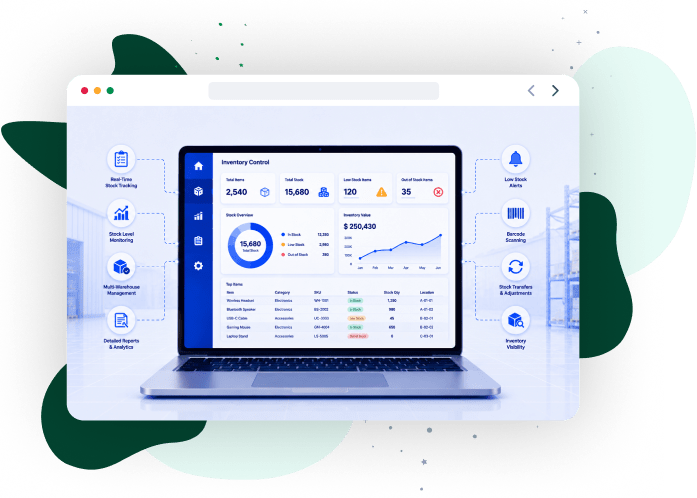
Organizations adopting custom inventory systems for supply chain operations configure data models, transaction rules, and workflow logic to match warehouse execution conditions. The system validates every stock movement, maps inventory to location structures, and reconciles discrepancies in real time to maintain consistent inventory states across procurement, warehousing, and fulfillment.
iCommuneTech delivers custom implementations that handle high transaction volumes, complex SKU hierarchies, and multi-location inventory networks. Each system integrates with ERP, WMS, and TMS platforms, enforces audit trails, and maintains performance under variable demand loads.
This guide explains how custom inventory control systems operate, integrate, and scale across supply chain environments. It covers feature architecture, integration mechanisms, and performance metrics that directly impact throughput, inventory accuracy, and cost control in logistics and manufacturing operations.

Talk to iCommuneTech experts to design a system built around your operational requirements.
Get custom buildWhat Is Inventory Control Software?
Inventory control software tracks, validates, and records every stock movement in real time to maintain accurate inventory levels and controlled warehouse execution. It maintains alignment between physical stock and system records by enforcing transaction validation across receiving, storage, transfers, and dispatch.
The system maps inventory using structured entities such as SKUs, bin locations, batches, and serial numbers, and applies rule-based validation at each transaction point. Platforms built on inventory system fundamentals and architecture block invalid updates, enforce location accuracy, and synchronize inventory data across connected systems.
Inventory control software delivers 6 core functions across warehouse workflows:
- Transaction Validation: Verifies every inbound, internal, and outbound movement before updating records
- Real-Time Stock Tracking: Updates inventory positions instantly across locations and facilities
- Barcode-Based Execution: Confirms item, quantity, and location through scan validation
- Cycle Count Management: Schedules counts and isolates variances for reconciliation
- Exception Handling: Routes discrepancies such as damage, misplacement, or mismatch into controlled workflows
- Audit Trail Logging: Records time-stamped transaction history for traceability and compliance
Inventory control software operates at the execution layer of supply chain systems, where it records and validates stock activity in real time. In contrast, inventory management systems use this validated data for planning, forecasting, and inventory optimization across the network.
By enforcing transaction accuracy and real-time visibility, inventory control software reduces stock errors, prevents data inconsistencies, and supports efficient warehouse and logistics operations.
Understanding where inventory control ends and inventory management begins determines how organizations structure their systems and assign responsibilities across the supply chain.
What Is the Difference Between Inventory Control and Inventory Management?
Inventory control handles stock execution at the warehouse level, while inventory management governs planning, replenishment, and allocation across the supply chain. Inventory control validates every stock movement, whereas inventory management determines when, where, and how much inventory to position.
The following table compares inventory control and inventory management across 5 functional areas:
| Function Area | Inventory Control | Inventory Management |
|---|---|---|
| Primary Role | Executes and validates stock movements | Plans and optimizes inventory across locations |
| Core Activities | Receiving validation, bin transfers, cycle counts, and dispatch confirmation | Demand forecasting, reorder planning, and safety stock definition |
| Data Usage | Records real-time stock transactions | Uses validated data for planning decisions |
| System Layer | Warehouse execution layer | Planning and optimization layer |
| Decision Scope | Location-level accuracy and control | Network-level inventory positioning |
Example: Inventory control confirms that 100 units are received, stored, and picked correctly in a warehouse. Inventory management decides whether 100 units should be stocked at that location based on demand forecasts and service targets.
This distinction drives 2 system selection decisions:
- Use inventory control software when operations need strict transaction validation and location-level accuracy
- Use inventory management systems when planning, forecasting, and multi-location allocation to drive decisions
Separating execution from planning maintains accurate stock records at the warehouse level and supports optimized inventory distribution across the supply chain. Warehouse inventory control applies these execution principles at the bin level, where stock accuracy directly determines throughput and fulfillment performance.
Driving Measurable Results Across Industries
From automating manual calculations to modernizing legacy infrastructure, we build software that directly impacts the bottom line. Our custom solutions consistently reduce operational costs and accelerate process efficiency.
View Our Case Studies
What Is Warehouse Inventory Control Software?
Warehouse inventory control software controls bin-level storage, validates stock movements, and executes warehouse tasks across high-throughput and multi-location facilities. It processes putaway, replenishment, picking, and packing through rule-driven workflows that maintain accurate inventory positions across zones, racks, and sites.
In production and supplier environments, the system tracks lot-controlled and serialized inventory, maps stock across facilities, and enforces location-level accuracy during continuous operations. Solutions aligned with warehouse management system capabilities execute wave-based picking, zone-based task allocation, cross-docking flows, and slotting logic to sustain throughput under high transaction volumes.
Warehouse inventory control systems handle execution through 4 defined control mechanisms:
- Scan-Enforced Validation: Verifies item, quantity, and location during receiving, picking, and transfers.
- Exception Queue Processing: Isolates variances such as mismatch, damage, or misplacement for resolution.
- Audit Log Tracking: Records time-stamped transaction history for traceability and compliance.
- Task Queue Execution: Assigns and sequences warehouse tasks based on priority and workflow rules.
Integration with transportation systems links warehouse execution to shipment building, load sequencing, and dock scheduling, so picked inventory aligns with dispatch timelines and outbound transport plans.
What Are the Key Features of Inventory Control Software?
Key features of inventory control software define how the system captures, validates, tracks, and synchronizes inventory data across warehouse operations to maintain accuracy and execution control.
The following 9 features cover the core mechanisms that control stock movement, maintain real-time visibility, and enforce transaction accuracy across supply chain operations.
Platforms built with automated inventory and stock tracking capabilities capture stock activity in real time, reduce manual input errors, and standardize inventory data across systems.
1. Transaction Logging and Validation:
Captures every inventory movement with time-stamped records and blocks invalid or unauthorized updates.
2. Real-Time Inventory Tracking:
Updates stock positions instantly across bins, zones, and facilities.
3. Bin-Level Location Control:
Assigns SKUs to defined storage locations and enforces accurate placement and retrieval.
4. Cycle Count Execution:
Schedules counts by SKU classification and isolates variances for reconciliation.
5. Barcode-Driven Execution:
Verifies item, quantity, and location through scan validation during receiving, picking, and transfers.
6. Replenishment and Reorder Control:
Triggers restocking actions based on consumption rates, minimum thresholds, and reorder logic.
7. Exception Handling Workflows:
Routes discrepancies such as mismatches, damage, or misplacement for resolution.
8. Inventory Ledger and Reporting:
Records transaction history and generates reports for audit, compliance, and performance tracking.
9. System Integration Layer:
Synchronizes inventory data across ERP, order management, warehouse, and transport systems through defined interfaces.
Together, these 9 features control inventory execution, reduce stock errors, and maintain accurate inventory visibility across warehouse and logistics operations.
What Is Barcode Scanner Software for Inventory Control?
Barcode scanner software for inventory control captures and verifies stock data at the point of activity to reduce manual input errors and accelerate warehouse execution. It replaces manual entry with encoded data capture using barcodes or QR codes to ensure accurate item, quantity, and location identification during receiving, picking, and transfers.
Solutions built for barcode scanning in logistics environments connect RF handhelds, fixed scanners, and camera-based devices to support high-speed data capture across docks, storage zones, and packing stations.
The following capabilities define how barcode scanning improves accuracy, speed, and execution control in warehouse operations:
SKU and Location Encoding: Assigns barcodes to items, bins, and pallets to standardize identification across storage and handling units.
Scan-Based Verification: Checks scanned inputs against expected SKU, batch, and location to prevent mismatches during execution.
Multi-Device Integration: Connects handheld scanners, mobile devices, and vision systems within a unified workflow.
Pick Confirmation Control: Verifies picked items against order lines to reduce mis-picks and shipment errors.
High-Speed Capture Processing: Records scan events instantly to support high-volume operations without delays.
Exception Detection: Flags invalid scans, duplicate entries, and unauthorized movements for corrective action.
Data Synchronization: Transfers scan events into inventory records through system-integrated communication protocols.
Barcode scanning reduces manual intervention at critical execution points, improves processing speed, and minimizes handling errors across warehouse workflows.
What Are Stock Control Apps and Mobile Solutions?
Stock control apps and mobile solutions process inventory transactions in real time through handheld devices and cloud platforms to enable mobile receiving, issuing, and stock updates across multi-location operations. They remove dependency on fixed terminals and allow warehouse and field teams to capture and update inventory data directly at the point of activity.
Platforms designed for digital inventory systems with mobile access connect mobile users to centralized inventory records to maintain real-time visibility and synchronized stock data across warehouses, yards, and remote sites.
The following capabilities define how mobile solutions improve execution speed, field access, and inventory control:
Handheld Task Execution:
Processes receiving, issuing, transfers, and adjustments directly from mobile devices within warehouse and field locations.
Real-Time Data Synchronization:
Updates inventory records instantly across facilities through cloud-based services.
Multi-Site Inventory Handling:
Manages stock across warehouses, yards, and remote storage locations within a unified system.
Access Control Enforcement:
Restricts system actions through role-based permissions and user authentication.
Offline Transaction Capture:
Records inventory updates during connectivity loss and syncs automatically upon reconnection.
Mobile Monitoring and Alerts:
Displays stock status, exception alerts, and task queues for operational oversight.
Approval Workflow Routing:
Processes stock approvals and movement authorizations through mobile interfaces.
Mobile execution improves response time, reduces manual dependency on fixed systems, and maintains continuous inventory updates across distributed operations.
What Are Advanced Stock Inventory Control System Integrations?
Advanced stock inventory control system integrations synchronize inventory data, automate cross-system workflows, and connect warehouse execution with enterprise and transport platforms. These integrations trigger downstream actions across planning, storage, and distribution systems whenever inventory transactions occur.
Systems built around supply chain system integration and automation exchange inventory data through defined interfaces, map transaction structures across systems, and trigger process flows based on stock events.
The following table 1 shows how inventory control systems integrate with 5 core enterprise and logistics platforms, and the data flows between them:
| Integration System | Functional Role | Data Exchange Scope |
|---|---|---|
| ERP Systems | Aligns financial records with inventory transactions | Stock valuation, purchase orders, goods receipts, and accounting entries |
| Warehouse Management Systems (WMS) | Executes storage and fulfillment operations | Location assignments, pick execution, and dispatch records |
| Transportation Management Systems (TMS) | Links shipment execution with inventory availability | Load plans, shipment status, dispatch timelines |
| Order Management Systems (OMS) | Controls order allocation and fulfillment sequencing | Order lines, allocation rules, fulfillment status |
| Telematics Systems | Tracks vehicle movement against delivery execution | Vehicle position, delivery confirmation, transit updates |
The following table 2 mechanisms define how these integrations operate at a system level:
| Mechanism | Function |
|---|---|
| API Contracts | Exchanges structured data between systems using defined endpoints |
| Event Propagation | Triggers downstream processes when inventory states change |
| Message Queues | Transfers data asynchronously across systems without blocking execution |
| Data Mapping Rules | Aligns field formats and data structures between systems |
Integration layers trigger automated workflows, maintain synchronized inventory states, and keep warehouse, transport, and financial systems operating on consistent data.
What Are the Essential Inventory Control Integrations?
Essential inventory control integrations link warehouse transactions with transport execution, order allocation, and supplier coordination systems to improve decision-making and operational responsiveness across inbound and outbound flows.
Systems implemented with transportation management software integration connect inventory availability with shipment scheduling, load planning, and dispatch execution, so stock positions directly drive transport decisions.
The following table 3 shows how inventory control systems interact with 4 key operational platforms and the outcomes each integration produces:
| Integrated System | Integration Function | Execution Outcome |
|---|---|---|
| Transportation Management Systems (TMS) | Synchronizes shipment schedules with inventory availability | Ensures load sequencing and dispatch readiness |
| Fleet Tracking Systems | Tracks vehicle movement against shipment status | Enables coordination between dock operations and delivery routes |
| Order Management Modules | Allocates orders based on location-level stock | Ensures fulfillment accuracy against demand priority |
| Vendor Portals / SRM Systems | Coordinates supplier communication for inbound stock | Supports controlled replenishment and supplier visibility |
These integrations align execution signals across transport, order processing, and supplier systems to support coordinated operations across distribution networks.
How Do You Choose the Best Stock Inventory Control Software?
Choose the best stock inventory control software by evaluating system performance, scalability, data governance, integration capability, and support model against defined operational requirements. Selection must account for SKU complexity, transaction volume, facility structure, and required system responsiveness under peak workloads.
A structured evaluation using inventory optimization and system selection criteria compares solutions against measurable benchmarks instead of feature lists. According to Grand View Research, the global inventory management software market is projected to reach USD 7.14 billion by 2033, growing at a CAGR of 8.9% from 2026 to 2033. This growth reflects demand for scalable, integrated inventory systems that support multi-location operations and real-time execution.
The following table 4 presents a 6-dimensional evaluation framework for assessing inventory control software against operational and technical criteria:
| Evaluation Dimension | Assessment Criteria | Acceptance Thresholds |
|---|---|---|
| Workload Capacity | Concurrent users, transaction rate, and queue handling | Sustains peak throughput without backlog or timeout |
| Data Governance | Audit trails, access control, and version tracking | Enforces traceability and prevents unauthorized changes |
| Interoperability | API contracts, schema mapping, and webhook support | Integrates with ERP, WMS, and TMS without disruption |
| Deployment Model | Cloud, on-premise, hybrid options | Aligns with infrastructure and latency requirements |
| Configuration Flexibility | Rule engines, parameter control, workflow configuration | Adapts to operational changes without code modification |
| Support Model | SLA terms, escalation paths, and release cycles | Ensures issue resolution and system continuity |
Selection Approach: 5 Steps to Evaluate Inventory Control Software
- Define Acceptance Criteria: Set thresholds for throughput, latency, accuracy, and system response.
- Execute Scenario Testing: Simulate inbound, allocation, and exception workflows under load conditions.
- Validate Integration Interfaces: Test API endpoints, data contracts, and failure recovery logic.
- Verify Configuration Flexibility: Confirm rule updates, field mappings, and workflow adjustments without redevelopment.
- Assess Vendor Support: Review SLA commitments, escalation processes, and upgrade cycles.
iCommuneTech supports system selection by mapping operational requirements to system capabilities, validating integration readiness, and setting implementation benchmarks to reduce deployment risk.
A criteria-driven evaluation confirms that selected systems handle operational load, integrate with existing platforms, and maintain consistent performance under real-world conditions.
What Is the Difference Between Commercial Inventory Control Software and Custom Solutions?
Commercial inventory control software provides pre-configured, plug-and-play modules with fixed data structures, while custom solutions build system logic, data models, and workflows around specific operational requirements. Commercial systems standardize processes, whereas custom solutions adapt to complex warehouse, transport, and supply chain conditions.
A structured custom vs commercial inventory software solutions comparison defines how both approaches perform under varying operational constraints:
| Evaluation Dimension | Commercial Software | Custom Solutions |
|---|---|---|
| Data Model Extensibility | Fixed schemas with limited field extension | Extensible entities, custom attributes, and hierarchical structures |
| Workflow Orchestration | Preset process flows | Configurable workflows and state-based execution logic |
| Interface Contracts | Prebuilt connectors with constrained mappings | Custom APIs, schema transformations, and event routing |
| Exception Handling | Generic error handling | Context-driven exception workflows with rule-based resolution |
| Regulatory Controls | Standard compliance templates | Domain-specific validation rules and traceability controls |
| Release Governance | Vendor-managed updates and release cycles | Controlled versioning, deployment pipelines, and rollback strategies |
| Performance Tuning | Limited tuning parameters | Query optimization, indexing strategies, and workload tuning |
The following considerations define when to select each approach based on operational requirements:
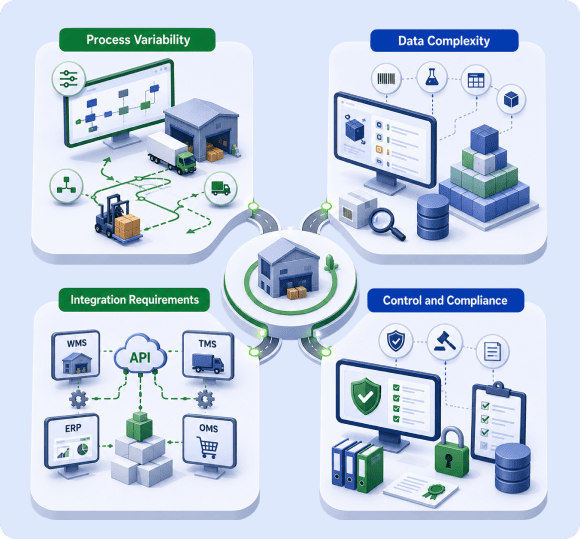
Non-standard warehouse flows and transport-linked operations require configurable workflows.
Multi-attribute SKUs, batch tracking, and hierarchical inventory structures require extensible data models.
Multi-system environments require flexible APIs and transformation layers.
Regulated inventory and audit requirements require system-level validation and traceability.
Commercial software fits standardized operations with limited variation, while custom solutions support high-volume, multi-location environments that need precise control over workflows, integrations, and performance.
iCommuneTech delivers custom inventory control systems by mapping operational workflows, engineering scalable data models, and building integration-ready architectures that match warehouse and transport execution requirements.
How Do You Evaluate Inventory Control System ROI?
Evaluate inventory control system ROI by measuring reductions in inventory loss, stockouts, labor effort, and carrying cost, and converting these changes into financial impact against a pre-deployment baseline. ROI quantifies how improvements in accuracy, throughput, and inventory utilization translate into cost savings and revenue protection.
A KPI-driven model using supply chain analytics for performance measurement links warehouse metrics to financial outcomes through consistent measurement and variance calculation.
The following KPIs define how inventory control performance converts into measurable financial impact:
| KPI Category | Metric Definition | Measurement Method | Financial Effect |
|---|---|---|---|
| Loss Control | Value loss from damage, theft, or misplacement | (loss value ÷ total inventory value) | Reduces write-offs |
| Service Level | Order fulfillment against demand | Fill rate, backorder ratio | Protects revenue and reduces stockouts |
| Labor Output | Throughput per labor unit | Lines per hour, picks per shift | Lowers unit handling cost |
| Carrying Cost | Cost of holding stock | Capital cost, storage, insurance | Releases working capital |
| Inventory Turns | Stock rotation frequency | Cost of goods sold ÷ average inventory | Improves capital utilization |
| Space Utilization | Storage efficiency | Occupancy ratio, slot utilization | Increases capacity without expansion |
ScienceDirect reports that warehouse process cycle efficiency increased from 40% to 70% after process improvement. Higher process efficiency reduces non-value-added activities, increases throughput, and lowers operational cost per unit in manufacturing environments.
Calculation Approach: 4 Steps to Measure Inventory Control ROI
Capture Baseline Metrics
Measure pre-deployment KPIs under stable operating conditions.
Measure Post-Implementation Deltas
Calculate KPI changes across equivalent time periods.
Convert Metrics to Financial Impact
Translate loss reduction, labor gains, and inventory improvements into cost savings and revenue protection.
Validate Sustainability
Confirm consistent performance across multiple operating cycles.
ROI evaluation converts operational improvements into financial results so organizations can quantify cost savings, capacity gains, and efficiency improvements from inventory control systems.
What Are the Core Objectives of Inventory Control Management?
The core objectives of inventory control management are to maintain service reliability, control inventory costs, enforce regulatory compliance, and align stock levels with production and demand requirements in manufacturing and warehouse environments. These objectives define how inventory systems support operational performance, financial control, and uninterrupted material flow.
Alignment with supply chain planning and inventory alignment links inventory levels with production schedules, procurement cycles, and demand signals to prevent overstocking and shortages.
The following objectives define how inventory control systems drive measurable performance outcomes across operations:
| Objective Area | Control Focus | Measurable Outcome |
|---|---|---|
| Service Targets | Meets demand with required service levels | Achieves a consistent fill rate and order fulfillment reliability |
| Working Capital Control | Reduces excess stock and capital lock-in | Improves inventory turns and lowers carrying costs |
| Regulatory Adherence | Enforces compliance controls and traceability records | Meets audit requirements and regulatory standards |
| Demand Synchronization | Matches stock levels with demand variability | Reduces imbalance across locations |
| Stock Accuracy | Validates consistency between recorded and physical stock | Minimizes variance and reconciliation effort |
| Flow Continuity | Maintains uninterrupted material movement | Prevents production and dispatch delays |
These objectives define control priorities so that inventory supports production output, financial discipline, and compliance requirements.
What Are the Types of Stocks in Inventory Control?
Types of stocks in inventory control fall into 7 categories: raw materials, work-in-progress, finished goods, spare parts, safety stock, emergency stock, and controlled or regulated inventory, each defined by its role in manufacturing and supply chain operations. Each category determines how inventory is stored, replenished, and controlled across production and distribution workflows.
Classification within manufacturing inventory classification systems maps inventory types to specific control rules based on usage patterns, demand variability, and operational criticality.
The following categories define how different stock types support operational decisions across manufacturing environments:
| Stock Type | Functional Role | Decision Parameter |
|---|---|---|
| Raw Materials | Supports production input requirements | Determines procurement lead time and order quantity |
| Work-in-Progress (WIP) | Tracks items across production stages | Controls work center scheduling and queue flow |
| Finished Goods | Supports order fulfillment and distribution | Drives demand planning and dispatch decisions |
| Spare Parts / MRO Inventory | Supports equipment maintenance and uptime | Determines maintenance cycles and downtime risk mitigation |
| Safety Stock | Buffers demand and supply variability | Sets service level targets and variability thresholds |
| Emergency Stock | Covers disruption and contingency scenarios | Defines risk exposure and response planning |
| Regulated / Controlled Inventory | Enforces compliance for restricted items (e.g., pharmaceuticals, chemicals) | Requires traceability controls and regulatory adherence |
Each stock category drives specific decisions across procurement, production scheduling, storage allocation, and risk management, ensuring that inventory supports operational continuity and cost control.
How Do You Properly Manage Controlled Substance Inventory?
Manage controlled substance inventory by enforcing custody controls, validating handling processes, securing storage, and maintaining audit-ready records that meet regulatory requirements for pharmaceuticals and chemical operations. These controls maintain full traceability, prevent unauthorized access, and support audit compliance across all inventory handling stages.
Systems aligned with inventory compliance and regulatory control systems apply rule-based validation, access restrictions, and audit tracking to meet regulatory and inspection requirements.
The following governance controls define best practices for managing controlled substance inventory:
Chain-of-Custody Enforcement: Verifies ownership transfer with authenticated user actions at each handoff point.
Lot and Serial Traceability: Tracks each unit through batch identifiers and serial numbers across lifecycle stages.
Access Authorization Controls: Restricts system and physical access using role-based permissions and dual-control mechanisms.
Secure Storage Segmentation: Isolates controlled substances within restricted zones with monitored access points.
Regulatory Logging Requirements: Records transaction history with timestamps, user IDs, and action types for audit inspection.
Variance Investigation Protocols: Identifies discrepancies and routes them through documented deviation handling workflows.
Expiration and Shelf-Life Monitoring: Monitors expiry dates and triggers removal or quarantine of outdated stock.
Audit Trail Preservation: Stores immutable transaction records for compliance verification and regulatory audits.
Failure to enforce these controls increases the risk of audit violations, regulatory penalties, and unauthorized inventory movement in controlled environments.
How Does Inventory Control by the ABC Technique Support Stockpiling Strategies?
The ABC technique classifies SKUs based on annual consumption value (unit cost × annual usage) to prioritize inventory control and stockpiling decisions. It groups items into A, B, and C categories.
Segmentation aligned with demand planning and stock prioritization methods maps demand patterns to class-specific replenishment and stocking policies instead of applying uniform rules across all SKUs.
The following classification defines how inventory is segmented and how stockpiling policies vary across categories:
| Class | Quant Rule (Typical) | Policy Parameters |
|---|---|---|
| A | Top 70–80% of inventory value, low item count | Continuous review (Q, R), tight service targets, small lot sizes, low days of supply |
| B | Mid 15–25% of inventory value, moderate item count | Periodic review (P, S), moderate service targets, balanced lot sizes |
| C | Low 5–10% of inventory value, high item count | Infrequent review, larger lot sizes, higher days of supply |
Stockpiling Policy Controls: 6 Classification-Driven Parameters
The following controls define how organizations set inventory buffers, review cycles, and order policies based on SKU classification:
- Service Target by Class: Defines higher fill-rate targets for A items, moderate targets for B items, and lower targets for C items.
- Buffer Sizing: Calculates safety stock using demand variability (σ) and lead-time variance (σLT).
- Order Policy Selection: Applies (Q, R) models for high-value items and periodic or min–max models for others.
- MOQ and EOQ Application: Applies supplier constraints to optimize order quantities.
- Coverage Windows: Sets days-of-supply limits to control inventory exposure.
- Reclassification Cadence: Updates ABC classification periodically to reflect demand changes.
ABC-based stockpiling prioritizes high-value inventory for tighter control while simplifying management of low-value, high-volume items to balance service levels with working capital efficiency.
What Are the Best Practices in Stock Inventory Control Management?
Best practices in stock inventory control management improve inventory accuracy, reduce transport delays, and maintain continuous stock visibility through structured counting, automation, and discrepancy resolution processes. These practices maintain consistent execution across warehouse and transport-linked operations.
Alignment with supply chain visibility and operational control practices enables real-time monitoring across docks, yards, and distribution nodes, supporting coordinated execution and faster response to operational disruptions.
The following best practices define how inventory control systems maintain accuracy, optimize workflows, and support transport efficiency:
- Class-Based Count Scheduling: Assigns count cycles based on ABC classification with defined tolerance limits.
- Variance Attribution Matrix: Maps discrepancies to root causes such as receiving errors, picking mistakes, or location mismatches.
- Rule-Driven Task Orchestration: Triggers allocation, replenishment, and movement tasks through configurable rule sets.
- Dock Throughput Control: Tracks inbound processing rates and staging flow to prevent congestion and delays.
- Slotting Optimization Models: Positions SKUs based on velocity, cube utilization, and handling constraints.
- Pick Path Optimization: Defines efficient travel sequences to reduce movement time and increase picking speed.
- Compliance Enforcement Controls: Applies regulatory checks for restricted inventory handling and documentation.
- Segmentation-Based Policies: Applies differentiated control rules based on SKU classification and demand behavior.
- Performance Metric Tracking: Tracks fill rate, throughput, and variance ratios for operational monitoring.
- Reverse Logistics Handling: Defines inspection and disposition workflows for returned inventory.
Together, these 10 practices reduce stock discrepancies, improve warehouse throughput, and maintain synchronized execution between inventory operations and transport workflows.
What Are the Stock Counting Approaches and Tools?
Stock counting approaches verify inventory accuracy through physical audits and system-driven counting methods to enable real-time stock validation and discrepancy detection across warehouse operations. Each method supports different accuracy levels, operational constraints, and labor requirements.
Solutions built with inventory counting software and automation tools automate count scheduling, capture discrepancies, and synchronize inventory records for continuous accuracy.
The following methods compare how inventory counting approaches differ in execution, benefits, and limitations:
| Counting Method | Execution Model | Advantage | Constraint |
|---|---|---|---|
| Full physical count | Executes a wall-to-wall audit at defined intervals | Provides complete inventory validation | Requires shutdown and high labor allocation |
| Cycle counting | Executes scheduled counts based on SKU classification | Maintains accuracy without a full shutdown | Depends on adherence to count schedules |
| Spot counting | Executes targeted checks for selected SKUs or bins | Enables rapid validation of critical items | Does not cover the full inventory scope |
| Perpetual count systems | Executes continuous validation through system records | Maintains real-time record alignment | Relies on process discipline and system accuracy |
Supporting Counting Technologies
The following technologies enable automated data capture, faster count execution, and accurate discrepancy identification:
RF-Based Data Capture:
Records count inputs at storage locations using handheld devices.
Barcode Identification Systems:
Maps SKUs and bins for structured count execution.
Vision-Based Counting Systems:
Detects item quantities using image processing models.
Count Orchestration Platforms:
Schedules counts, logs discrepancies, and manages reconciliation workflows.
Exception Queues:
Routes mismatches for investigation and resolution.
Stock counting methods combined with automation improve inventory accuracy, reduce manual effort, and maintain continuous validation across warehouse operations.
How Do You Calculate Reorder Point and Apply Demand Forecasting Methods?
Reorder point (ROP) calculates when to trigger replenishment based on demand rate, lead time, and safety stock to prevent stockouts and excess inventory. Forecasting models supply demand inputs to drive accurate reorder decisions and stable inventory flow. Inventory systems automate these calculations using real-time demand data and predefined policies.
Reorder Point (ROP)
d_avg = 120 units/day
L = 4 days
SS = 180 units
Safety Stock (Service-Level)
Z = 1.65 (95% service level)
σd = 20 units/day
L = 4 days
Forecasting Models (Inputs to ROP)
The following models estimate demand patterns used in reorder calculations:
- Moving Average (MA): Smooths short-term demand variation for stable demand patterns.
- Exponential Smoothing (SES/Holt): Assigns higher weight to recent demand and adapts to trends.
- Seasonal Models (Holt-Winters): Captures recurring seasonal demand patterns.
- Regression Models: Link demand with external variables such as price or promotions.
- Intermittent Demand Models (Croston/SBA): Estimates demand for irregular or low-frequency items.
Parameterization Controls
The following controls define how systems adjust reorder logic based on operational conditions:
Lead Time Distribution
Models variability in supplier lead time for buffer calculation.
Service Level Targeting
Selects Z value based on fill rate or service objectives.
Review Policy Selection
Applies continuous (Q, R) or periodic (P, S) review models.
Lot Sizing
Incorporates EOQ and MOQ constraints into order quantities.
Outlier Treatment
Removes or caps abnormal demand values before forecasting.
System-driven parameterization automates reorder decisions, stabilizes inventory levels, and improves service reliability under variable demand conditions.
Case Study: How a Pharmaceutical Manufacturer Cut Overhead Costs by 32% with Inventory Control
A pharmaceutical manufacturing company implemented an inventory control solution to address excess stock levels, poor demand visibility, and inefficient inventory planning processes that constrain cost structure and operational performance.
Before implementation, the organization struggled to align inventory levels with demand patterns, resulting in overstocking, increased carrying costs, and limited visibility into inventory utilization. Manual processes and fragmented data further constrained decision-making and inventory optimization.
The solution introduced structured inventory analytics, demand-driven planning models, and centralized data visibility to improve stock control and cost management. The system drove data-backed inventory decisions, optimized stock levels, and reduced operational inefficiencies.
This case study demonstrates how structured inventory control systems combined with demand-driven analytics can reduce operational costs, improve inventory utilization, and enable data-driven decision-making in manufacturing environments.
Check more success stories
Client: Pharmaceutical Manufacturing Company
Technology: Inventory Management and Analytics Solution
Measured impact:
Why Choose iCommuneTech for Inventory Control Software Projects?
Choose iCommuneTech for inventory control software projects based on proven delivery in complex supply chain environments, custom system engineering capability, and measurable operational outcomes across warehouse and transport networks. The team designs systems that match real-world execution requirements, not generic software models.
Solutions built on supply chain management software expertise translate operational workflows into scalable, production-grade systems with reliable performance under high transaction volumes.
iCommuneTech Capability Framework
The following capabilities define how iCommuneTech designs, builds, and supports inventory control systems for enterprise supply chain operations:
Solution Architecture Design
Defines modular system architecture with scalable components and clear interface boundaries.
Model-Driven Development
Builds extensible data models and configurable logic to support evolving business rules.
Interface Engineering
Develops API contracts, data transformations, and event-driven integration pipelines.
Security Framework Implementation
Enforces access control, audit tracking, and data protection mechanisms.
Performance Engineering
Optimizes queries, indexing, and workload handling for high transaction throughput.
Deployment Orchestration
Manages environment setup, version control, and release execution across deployment models.
Quality Assurance Execution
Validates system performance through scenario testing, stress testing, and defect resolution.
Lifecycle Support
Maintains system stability through monitoring, patch updates, and controlled upgrades.
iCommuneTech delivers systems that handle complex inventory workflows, integrate with enterprise platforms, and maintain consistent performance across high-volume supply chain operations.
How Do You Get Started with Inventory Control Modernization?
Start inventory control modernization by assessing current operations, defining requirements with experts, validating solution fit, and implementing a tailored system built around business goals. The process matches system capabilities to operational needs before deployment.
The following 6 steps define how organizations initiate and execute inventory control modernization with iCommuneTech:
Operational Assessment
Evaluates current inventory processes, system gaps, and performance issues across warehouse and transport operations.
Requirement Definition
Identifies business needs, data structures, workflow requirements, and integration scope.
Expert Consultation and Demo
Reviews solution capabilities, validates use cases, and demonstrates system workflows aligned with operational scenarios.
Solution Blueprinting
Designs system architecture, data models, and integration points based on defined requirements.
Proposal and Scope Finalization
Defines project scope, timelines, resource allocation, and delivery milestones.
Phased Implementation Execution
Deploys the system in controlled stages with validation checkpoints and rollback planning.
This structured approach ensures that organizations select the right solution, validate fit before implementation, and achieve predictable deployment outcomes.
Connect with iCommuneTech experts to assess your operations and define the right system for your environment.
Get Started