
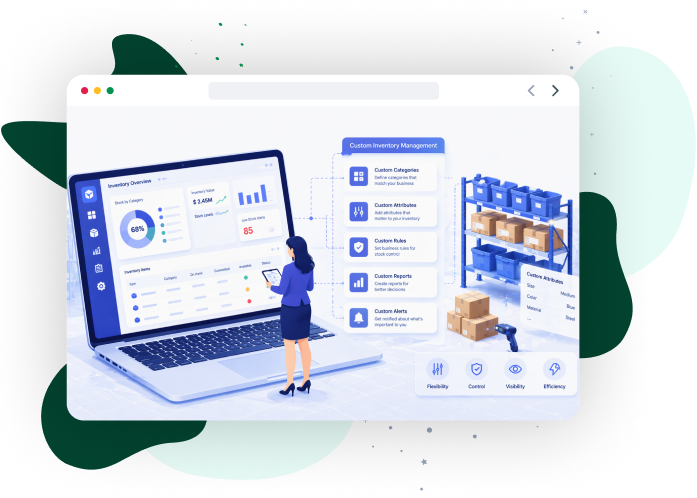
Multi-warehouse enterprises require inventory platforms that integrate with ERP systems, warehouse management systems, and accounting infrastructure. A custom inventory management system aligns inventory workflows with procurement cycles, warehouse execution, and demand planning processes. Integrated data pipelines propagate inventory updates across enterprise applications and maintain a single but consistent inventory record.
This guide explains the architecture and capabilities behind custom inventory software, including core features, deployment models, integration frameworks, and cost considerations. It outlines measurable outcomes such as improved inventory accuracy, reduced stockouts, and stronger working capital control across distributed supply chain environments.
Learn how custom inventory management software automates stock control and integrates enterprise workflows.

Start planning your enterprise custom inventory platform with iCommuneTech.
Go for ImplementationWhat is Custom Inventory Management Software for Modern Enterprises?
Custom inventory management software is a centralized system that records, tracks, and synchronizes SKU-level inventory transactions across procurement, warehouse, and fulfillment operations in real time.
Inventory control becomes unstable when stock data remains fragmented across spreadsheets, warehouse applications, and disconnected enterprise platforms. Custom inventory management software centralizes SKU transactions within a unified inventory system and synchronizes stock movements across warehouse, procurement, and fulfillment operations. Centralized transaction logs, therefore, maintain consistent inventory records across distributed supply chains.
Standardized SaaS inventory platforms often struggle to support enterprise inventory workflows involving multi-warehouse operations, complex fulfillment rules, and proprietary procurement processes. These constraints create integration gaps between warehouse management systems, ERP platforms, and finance applications. Research from Global Market Insights shows the inventory management software market is projected to grow at 6.4% annually through 2034, reflecting increasing enterprise adoption of platforms that centralize inventory visibility and automate stock transactions across supply chain operations.
A custom inventory management system aligns inventory workflows with enterprise operational architecture and removes manual reconciliation across enterprise applications.
Enterprise inventory environments operate under four core pressures:
- Maintain synchronized stock visibility across multiple warehouse locations
- Connect ERP platforms, WMS platforms, and accounting systems without data gaps
- Manage high SKU counts and transaction volume across distributed warehouses
- Scale inventory operations as fulfillment networks expand
Custom-built inventory architectures address these pressures through API and middleware integrations that synchronize inventory data across operational systems. Organizations modernizing their inventory system architecture often deploy platforms such as inventory management systems to unify warehouse execution, procurement workflows, and financial reporting within one inventory control environment.
Driving Measurable Results Across Industries
From automating manual calculations to modernizing legacy infrastructure, we build software that directly impacts the bottom line. Our custom solutions consistently reduce operational costs and accelerate process efficiency.
View Our Case Studies
What Are the Essential Features of Custom Inventory Management Software?
The essential features of custom inventory management software includes real-time tracking, system integration, demand forecasting, access control, and audit capabilities that ensure accurate and synchronized inventory operations across enterprise environments.
Enterprise inventory environments generate high transaction volumes across warehouses, procurement systems, and fulfillment operations. Custom inventory management software stabilizes these environments by embedding configurable logic within the inventory database. This design supports real-time transaction processing and consistent inventory visibility across operational systems.
Enterprise-grade platforms combine capabilities that strengthen stock visibility, reduce operational risk, and improve decision-making across distributed warehouse networks.
Key capabilities include:
- Track SKU movement in real time using barcode, QR, or RFID scanning
- Generate automated alerts and inventory reports for threshold breaches
- Integrate ERP, CRM, and financial systems into a unified workflow
- Optimize inventory levels using forecasting and predictive analytics
- Control access with role-based permissions and audit trails
- Validate stock accuracy through cycle counting and audit tools
Each capability strengthens inventory control and improves coordination across supply chain operations.
What is Real-Time SKU Tracking and Barcode Management?
Real-time SKU tracking and barcode management capture, identify, and record inventory movement instantly using scanning technologies to maintain accurate stock data across warehouse and fulfilment operations.
Inventory discrepancies increase when SKU updates rely on manual entry or disconnected systems. Real-time tracking records inventory transactions during receiving, storage, picking, and shipping activities. Barcode management enables accurate identification of SKUs at each touchpoint through structured scanning workflows. Together, these capabilities ensure that stock data reflects actual physical movement without delay.
Real-time environments rely on scanning technologies such as:- Barcode scanning for rapid SKU identification during receiving, picking, and shipping
- QR code scanning for compact labeling and mobile warehouse workflows
- RFID tracking for automated monitoring of pallets, containers, and bulk inventory
These technologies capture product location, batch data, and serial numbers across storage zones. Scanning workflows eliminate manual errors and improve allocation accuracy across warehouse operations.
Enterprises operating distributed warehouses connect SKU tracking and barcode systems with warehouse management systems (WMS). This integration synchronizes warehouse execution with inventory databases and logistics operations, ensuring consistent stock visibility across all locations.
What are Automated Alerts and Custom Inventory Reporting in Inventory Management System?
Automated alerts and custom inventory reporting monitor inventory conditions in real time and analyze transaction data to support faster decision-making and operational control.
Supply chain operations require immediate visibility into inventory fluctuations to maintain stable fulfillment performance. Automated alerts track predefined thresholds and trigger notifications when inventory risks emerge. These alerts enable teams to respond to stock changes before disruptions impact warehouse execution or order fulfillment.
Automated alert systems detect conditions such as:
Identify low stock levels and trigger replenishment actions
Detect stock imbalances across warehouse locations
Flag expiry or shelf-life risks for perishable or regulated inventory
Highlight delayed replenishment cycles affecting safety stock
These alerts allow procurement teams and warehouse supervisors to act early, improving replenishment timing and reducing stockout risk.
Custom inventory reporting analyzes transaction records and operational metrics to evaluate inventory performance. Reporting modules measure indicators such as inventory turnover, replenishment efficiency, and stock allocation across warehouse locations. These insights support demand planning, procurement coordination, and inventory control decisions.
How Do Custom Inventory Management System Integrate with ERP, CRM, and Accounting Systems?
Custom inventory management systems integrate with ERP, CRM, and accounting platforms through APIs and middleware to synchronize inventory, sales, and financial data in real time.
Enterprise inventory operations depend on consistent data exchange between inventory databases and core enterprise applications. Disconnected applications create reconciliation delays and inconsistent inventory records. Custom inventory management software integrates inventory databases with ERP, CRM, and financial systems to maintain synchronized operational data.
Integration frameworks connect enterprise platforms through APIs and middleware layers. These connections propagate inventory transactions across procurement, sales, and financial workflows without manual data transfer.
The following table shows how enterprise integrations support coordinated inventory operations.
| Enterprise System | Integration Function | Operational Impact |
|---|---|---|
| ERP platforms | Synchronize purchase orders and inventory valuation records | Align inventory transactions with financial reporting |
| CRM systems | Connect sales orders with available inventory quantities | Improve order allocation decisions |
| Accounting systems | Update the cost of goods sold and inventory valuation | Maintain consistent financial records |
| Procurement platforms | Transmit supplier purchase orders and replenishment requests | Support procurement planning and supplier coordination |
Enterprises expanding supply chain automation often connect inventory platforms with procurement software to synchronize supplier transactions and stock replenishment workflows. Platforms such as procurement software environments connect supplier purchasing processes with inventory databases and procurement operations.
How Do Custom Inventory System Use Optimization and Demand Forecasting?
Custom inventory systems use optimization models and demand forecasting engines to predict demand, calculate stock levels, and guide replenishment decisions across warehouse networks.
The following table outlines core optimization and forecasting capabilities.
| Capability | System Function | Operational Impact |
|---|---|---|
| Demand forecasting engines | Analyze historical demand patterns and sales signals | Improve forecast accuracy for replenishment planning |
| Safety stock calculation | Determine buffer stock levels for demand variability | Reduce stock shortages during demand fluctuations |
| Reorder point calculation | Establish replenishment thresholds for each SKU | Maintain continuous inventory availability |
| Inventory allocation models | Distribute inventory across warehouse locations based on demand | Improve order fulfillment responsiveness |
Enterprises strengthening demand planning capabilities often deploy inventory optimization platforms to support predictive analysis and replenishment planning. Platforms such as inventory optimization environments analyze demand signals and guide inventory allocation across supply chain operations.
What Are User Roles, Permissions, and Audit Trails in Inventory Management Systems?
In inventory management systems, user roles define access levels, permissions regulate allowed actions, and audit trails record every inventory transaction to ensure data integrity and compliance.
Enterprise inventory platforms store operational records that influence procurement decisions, warehouse transactions, and financial reporting. Unauthorized access or untracked modifications compromise inventory data integrity. Custom inventory management software applies role-based access control to regulate user access and modifications.
User roles define permissions for activities such as stock adjustments, purchase approvals, and reporting access. Role hierarchies assign responsibilities across administrative, operational, and supervisory users. These controls restrict sensitive operations while allowing warehouse teams to perform daily inventory tasks.
Audit trails record system activity and inventory transaction history. Transaction logs capture user actions, timestamps, and record modifications. These logs support internal audits, regulatory compliance, and discrepancy resolution.
Typical security and governance capabilities include:
- Role-based access control (RBAC) regulates permissions for inventory updates and approvals
- User hierarchy management, assigning administrative, operational, and supervisory roles
- Audit trail logging, recording transaction history, and system modifications
- Approval workflows controlling stock adjustments and inventory transfers
- Authentication and authorization controls protect access to inventory records and reporting modules
What Are Inventory Counting and Cycle Audit Tools in Custom Inventory Systems?
Inventory counting and cycle audit tools verify system-recorded stock against physical inventory through structured counting, reconciliation, and variance detection processes.
Recorded stock levels diverge from physical inventory due to transaction errors, misplaced goods, or delayed updates. Custom inventory management software includes modules for inventory counting and cycle audits that validate system records against physical stock. These modules support scheduled verification across warehouses and retail locations.
Cycle counting divides inventory into groups based on SKU value, movement frequency, or storage zones. Warehouse teams perform targeted counts to detect quantity variances and correct inventory records.
Enterprises operating distributed facilities deploy inventory counting software to coordinate audit workflows across storage locations. These platforms support structured counting programs and inventory reconciliation.
Inventory auditing capabilities typically include:
- Cycle counting schedules: verifying SKUs across warehouse zones
- Physical inventory reconciliation: comparing counted quantities with system records
- Variance detection tools: identifying quantity discrepancies
- Mobile counting applications: record counts directly from storage locations
- Audit reporting modules: documenting count results and adjustments
Deployment Options: Custom-Built vs SaaS vs Open Source vs No-Code
Organizations evaluating custom inventory management software must select a deployment model that aligns with enterprise architecture, governance requirements, and integration needs. These models differ in configurability, implementation control, and compatibility with existing enterprise systems.
Technology teams assess deployment options based on system flexibility, deployment speed, security governance, and integration capability with enterprise platforms. These factors influence how inventory platforms connect with ERP systems, warehouse platforms, and broader supply chain management software environments. Many enterprises align inventory architecture with platforms similar to supply chain management software ecosystems to coordinate procurement, logistics, and inventory operations
The following comparison outlines common deployment approaches for enterprise inventory platforms.
| Deployment Model | Flexibility & Customization | Integration Capability | Enterprise Suitability |
|---|---|---|---|
| Custom-Built | Fully configurable architecture aligned with operational workflows | Deep integration with enterprise systems | High |
| SaaS Platforms | Vendor-defined configuration with standardized features | Prebuilt integrations with common applications | Moderate |
| Open Source | Customizable with internal development resources | Integration depends on engineering capability | Moderate |
| No-Code Platforms | Configuration through visual development tools | Limited enterprise integration capability | Low to moderate |
What Are The Advantages of Custom-Built Inventory Solutions?
Custom-built inventory solutions provide five core advantages: workflow configurability, compliance control, legacy system integration, architecture ownership, and scalable system expansion.
Enterprise inventory operations include proprietary workflows, regulatory controls, and specialized warehouse procedures. Standardized platforms restrict configuration when organizations manage complex operational requirements or compliance rules. Custom-built inventory solutions enable organizations to design system logic that reflects internal workflows and governance policies.
Custom-built inventory platforms provide several advantages:
- Workflow configurability supporting organization-specific inventory and fulfillment processes
- Compliance alignment enforcing regulatory controls, and governance policies
- Legacy system connectivity integrating proprietary databases and enterprise applications
- Architecture control defines database structures and transaction logic
- Scalability flexibility supporting growth in warehouse networks and SKU volume
What Are The Pros and Cons of SaaS Inventory Platforms for Enterprises?
SaaS inventory platforms offer rapid deployment, predictable costs, and reduced infrastructure management, but they limit workflow customization, restrict system extensibility, and introduce data governance risks.
Organizations adopt SaaS inventory platforms when rapid deployment and predictable operating costs are priorities. Vendors host the application environment and deliver inventory functionality through subscription access. This model reduces infrastructure management and accelerates platform rollout.
SaaS architectures limit the configuration of inventory workflows and enterprise integrations. Enterprises managing multi-location operations or specialized fulfillment processes face restrictions in workflow design and system extensibility. Organizations must also assess governance factors such as data residency and vendor dependency.
Pros
- Enable rapid deployment without internal infrastructure setup
- Provide predictable costs through subscription pricing models
- Maintain platform availability through vendor-managed updates
- Reduce internal IT maintenance requirements
Cons
- Limited workflow configuration for complex operational requirements
- Restricted extensibility for proprietary business processes
- Integration limitations with legacy enterprise applications
- Data residency risks when inventory data resides in vendor-hosted environments
When Are Open Source and No-Code Inventory Software Solutions Viable?
Open source and no-code inventory software are viable for early-stage development, low-complexity operations, and rapid workflow prototyping without heavy engineering effort. These platforms provide configurable templates or publicly available codebases for building basic inventory applications. Organizations evaluate these tools during early system development or when operational requirements remain simple. These platforms allow teams to assemble inventory tracking workflows without extensive software engineering.
Enterprise inventory environments introduce higher transaction volumes, governance requirements, and multi-location coordination. Open source and no-code platforms lack structured security controls, long-term vendor support, and operational reliability required for enterprise supply chains.
Use cases
- Support inventory workflow prototyping during early system design
- Enable small business inventory operations with limited SKU volume
- Facilitate internal experimentation with workflow automation tools
- Operate as short-term solutions for limited transaction environments
Limitations
- Security control limitations for regulated enterprise environments
- Support constraints without dedicated vendor maintenance
- Scalability restrictions as SKU volume and warehouse networks expand
- Enterprise integration gaps with ERP, procurement, and logistics platforms
What Are the Deployment Models for Custom Inventory Software: Cloud, On-Premise, and Hybrid?
Custom inventory software is deployed through three models: cloud, on-premise, and hybrid, each defining how systems are hosted, controlled, and scaled within enterprise environments. Infrastructure architecture determines how inventory systems are hosted and managed within enterprise IT environments. Organizations evaluate deployment models based on governance requirements, regulatory compliance, and infrastructure ownership. Hosting architecture influences system scalability, data residency policies, and operational continuity.
Enterprises evaluate cloud, on-premise, and hybrid deployment models when implementing inventory platforms. Each model provides different levels of infrastructure control, security governance, and operational flexibility. Organizations assess these architectures during digital supply chain transformation initiatives that modernize enterprise systems. Platforms supporting initiatives such as digital supply chain transformation often assess hosting architecture alongside enterprise system modernization.
The following table compares cloud, on-premise, and hybrid deployment models across infrastructure ownership, security control, and cost structure.
| Deployment Model | Infrastructure Ownership | Security & Compliance Control | Cost Structure |
|---|---|---|---|
| Cloud | Vendor-managed infrastructure | Vendor-managed security with configurable access policies | Usage-based or subscription operating costs |
| On-Premise | Organization-owned infrastructure in internal data centers | Full internal control of security governance and compliance | Capital investment with ongoing maintenance costs |
| Hybrid | A combination of internal infrastructure and cloud services | Shared governance across internal and external environments | Mixed capital and operating cost structure |
Which Industries Benefit Most from Custom Inventory Solutions?
Retail, manufacturing, and food service industries benefit most from custom inventory solutions due to their complex workflows, regulatory requirements, and multi-location operations. Inventory operations differ across industries due to variations in product structure, transaction patterns, and regulatory requirements. Standardized platforms fail to support sector-specific requirements such as omnichannel retail distribution, production material tracking, or ingredient-level inventory control. Custom inventory management software enables organizations to configure inventory workflows according to industry operating models.
industry-specific inventory platforms connect stock records with operational systems such as manufacturing planning, order processing, and distribution networks. Manufacturers deploy specialized platforms to coordinate material availability with production activities. These manufacturing inventory software solutions link inventory data with production planning and supply chain operations.
The following sections explain how custom inventory solutions support inventory control across retail, manufacturing, and food service environments.
How Does Retail Inventory Management Support Multi-Channel and Omnichannel Integration?
Retail inventory management supports multi-channel and omnichannel integration by synchronizing stock availability across e-commerce stores, physical outlets, and wholesale distribution channels. Custom inventory management software connects point-of-sale systems, ecommerce platforms, and order management systems to maintain accurate stock records across retail channels. These connections allow retailers to allocate inventory across stores, warehouses, and fulfillment locations.
Retailers managing omnichannel commerce require inventory platforms that support synchronized operations across online and offline sales environments. Organizations deploy e-commerce inventory software solutions to coordinate stock data between digital storefronts, retail outlets, and warehouse facilities. These platforms support inventory coordination across e-commerce operations and retail networks.
Retail inventory platforms typically support the following capabilities:
POS integration updating inventory records after in-store sales
Omnichannel stock visibility across warehouses, retail stores, and ecommerce platforms
Order routing directs customer orders to the appropriate fulfillment location
B2B and wholesale order processing alongside retail and ecommerce transactions
Inventory synchronization between storefront platforms and warehouse systems
How Does Inventory Software for Manufacturing Manage BOM, WIP, and Production Tracking?
Inventory software for manufacturing manages BOM, WIP, and production tracking by linking material availability with production workflows and tracking inventory across all production stages. Manufacturing operations require precise coordination between material availability and production workflows. Custom inventory management software links material records with production processes and inventory transactions. These platforms track raw materials, components, and finished goods throughout the production lifecycle.
Manufacturers rely on structured systems to manage bill of materials (BOM) and monitor work-in-process (WIP) inventory across production stages. Inventory platforms also with production scheduling systems to align material availability with manufacturing schedules. These solutions such as production scheduling software coordinate material requirements with production timelines.
Manufacturing inventory platforms typically support the following capabilities:
- Bill of materials (BOM) management linking finished products with required components and raw materials
- Work-in-process (WIP) tracking and monitoring components across production stages
- Material allocation controls reserving components for production orders
- Production order synchronization aligns inventory records with manufacturing schedules
- ERP and MRP integration coordinate material planning with production systems
How Does Inventory Control Software Support the Restaurant and Food Sector?
Inventory control software supports the restaurant and food sector by tracking perishable ingredients, monitoring expiration dates, and recording ingredient consumption during food preparation. Food and beverage operations manage perishable ingredients with strict shelf-life and safety requirements. Inventory platforms monitor ingredient availability, track expiration dates, and record ingredient consumption during food preparation. Custom inventory management software structures inventory records at the ingredient level and supports controlled inventory monitoring across food service operations.
Restaurant operators manage inventory across multiple kitchens, storage areas, and distribution points. Inventory platforms track ingredient usage and maintain stock records across restaurant locations. These controls support kitchen coordination and reduce ingredient waste.
Food service inventory platforms typically support the following capabilities:
- Track ingredients at the item level and record raw materials used in menu preparation
- Monitor expiration dates and identify ingredients approaching shelf-life limits
- Deduct ingredients based on recipes when menu items are prepared
- Monitor stock across multiple locations including restaurant branches and storage areas
- Coordinate supplier orders for ingredient replenishment
How Does Inventory Control Software Integrate With Traditional and Custom IT Systems?
Inventory control software integrates with traditional and custom IT systems through APIs, middleware, and data exchange frameworks that synchronize inventory data across enterprise applications. Enterprise IT environments include legacy platforms, logistics applications, and proprietary operational systems. Custom inventory management software exchanges inventory data with these systems to support coordinated supply chain operations. Integration frameworks connect inventory databases with enterprise applications that manage procurement, customer orders, warehouse execution, and logistics activity.
These integrations maintain consistent inventory records across operational platforms and strengthen supply chain visibility across procurement, warehousing, and distribution processes.
Research from Deloitte shows that a data-driven inventory optimization initiative reduced inventory targets and reorder points by more than $25 million, freeing capital for other operational investments.
These findings show that advanced analytics and inventory management systems eliminate excess stock while improving financial efficiency across supply chain operations. Platforms supporting environments, such as supply chain visibility, enable monitoring of inventory movement and operational activity across supply chain networks.
Common integration scenarios include:
- ERP integration: linking inventory records with financial accounting and procurement transactions
- CRM integration: connecting customer orders with inventory availability
- Warehouse management system integration: coordinating warehouse operations with inventory records
- 3PL platform integration: exchanging shipment and inventory data with logistics providers
- Custom application integration: connecting proprietary enterprise systems with inventory platforms
How Do Inventory Control Platforms Integrate with Custom Software Ecosystems?
Inventory control platforms integrate with custom software ecosystems through APIs, middleware, and event-driven data exchange that synchronize inventory transactions across enterprise applications. Enterprises operate multiple applications across procurement, warehousing, logistics, and finance. Custom inventory management software exchanges inventory transactions with these systems to coordinate operational workflows. Integration architecture defines how enterprise platforms exchange inventory data while preventing isolated data environments.
Integration frameworks use APIs, middleware services, and event-driven communication to transfer inventory transactions and operational updates between systems. These mechanisms enable enterprise applications to access current inventory records and maintain coordinated operations.
Organizations connect inventory data with supply chain analytics platforms to evaluate demand patterns, stock turnover, and operational performance. These platforms analyze inventory transactions to support planning and supply chain monitoring.
The following table outlines common integration architectures used in enterprise inventory environments.
| Integration Architecture | Technical Mechanism | System Interaction | Operational Outcome |
|---|---|---|---|
| API-based integration | REST or GraphQL interfaces exchange structured data | Direct system-to-system communication | Supports real-time inventory transaction exchange |
| Middleware integration | Integration platforms route and transform data | Central integration layer connecting enterprise applications | Simplifies multi-system coordination |
| Webhook event integration | Event notifications trigger system updates | Applications subscribe to inventory events | Enables immediate operational updates |
| Batch data integration | Scheduled data transfers between systems | Periodic data exchange across applications | Supports legacy platforms requiring scheduled synchronization |
How Does Custom Inventory Control Improve Customer Satisfaction and ROI?
Custom inventory control improves customer satisfaction and ROI by enabling accurate product availability, reliable order fulfillment, and efficient replenishment planning. Customer experience depends on reliable order fulfillment and accurate product availability. Stock shortages, incorrect inventory records, and delayed replenishment reduce service reliability and increase order cancellations. Custom inventory management software improves operational performance by supporting accurate inventory planning and coordinated fulfillment workflows.
Inventory platforms connect product availability with order management software to process orders based on current stock levels. These Systems align inventory records with order processing and fulfillment operations.
Improved inventory control produces measurable business outcomes that influence customer experience and operational performance:
Faster order fulfillment through efficient inventory allocation across fulfillment locations
Higher order accuracy by reducing picking and packing errors
Reduced stockouts and backorders through improved replenishment planning
Improved delivery reliability by aligning inventory availability with customer demand
Stronger customer trust and loyalty through consistent fulfillment performance
What Are the Cost and Budget Considerations for Custom Inventory Management Software?
Custom inventory management software costs depend on platform scope, integration requirements, infrastructure selection, and operational scale, including both initial development investment and ongoing operating expenses. Enterprise inventory platform projects require structured financial planning before development or deployment. Organizations evaluate both initial development investment and ongoing operating expenses.
Budget planning aligns with enterprise stock inventory control strategies that govern inventory accuracy, operational efficiency, and financial accountability. Inventory platforms strengthen governance and operational oversight.
Research from Deloitte shows that an inventory control tower implementation identified $14 million in cost savings during its initial beta phase by canceling unnecessary purchase orders and adjusting inventory commitments. These show that how real-time inventory visibility and data-driven decision systems improve purchasing accuracy and reduce surplus inventory.
The following sections outline the primary cost drivers, investment ranges, and pricing models for custom inventory platforms.
What Factors Influence the Cost of Custom Inventory Software?
The cost of custom inventory software depends on system scope, integration requirements, deployment architecture, and operational scale. Organizations evaluate technical and operational requirements before estimating project budgets.
The following table outlines key cost drivers, what increases cost, and their impact on enterprise inventory platforms.
| Cost Driver | What Increases Cost | Cost Impact |
|---|---|---|
| Feature complexity | Advanced workflow rules, forecasting engines, audit controls, and custom reporting | Expands development and testing effort |
| User and location scale | Higher user counts, warehouse count, and large SKU volume | Increases configuration and system performance requirements |
| System integrations | ERP, CRM, WMS, 3PL, and proprietary system connectivity | Requires API development and integration validation |
| Hosting architecture | Cloud, on-premise, or hybrid infrastructure | Changes infrastructure provisioning and maintenance costs |
| Support model | Extended support coverage and monitoring services | Increases ongoing operational expense |
| Regulatory compliance | Industry audit controls, security policies, and compliance validation | Expands governance and documentation efforts |
What Are the Budget Ranges and Total Cost of Ownership for Custom Inventory Software?
Budget ranges for custom inventory software depend on system scope, integration complexity, and organizational scale, including both implementation investment and ongoing operating costs. Enterprise adoption requires estimating both implementation investment and ongoing operating costs. Cost planning includes development expenditure, infrastructure, maintenance, and platform updates.
The following table outlines investment ranges based on project scope, implementation context, and cost considerations.
| Project Scope | Typical Implementation Context | Estimated Budget Range | Cost Considerations |
|---|---|---|---|
| Small-scale deployment | Single warehouse, limited integrations, moderate SKU volume | $50,000+ | Core inventory modules, limited customization |
| Mid-size enterprise platform | Multi-location inventory operations with ERP integration | $80,000 – $200,000 | Custom workflows, integration development, and reporting modules |
| Large enterprise implementation | Multi-warehouse networks with advanced automation and analytics | $400,000 – $600,000+ | Complex integrations, forecasting engines, and high transaction volume |
Total cost of ownership includes implementation investment, infrastructure hosting, operational maintenance, and system upgrades.
What Is the Difference Between Subscription and One-Time Development Models?
Subscription and one-time development models differ in cost structure, ownership, and system flexibility. Subscription models charge recurring licensing fees, while one-time development requires upfront investment with optional maintenance contracts. Inventory platforms are deployed through these two models based on business requirements and system control needs.
The following table compares subscription and one-time development models across cost structure, advantages, and limitations.
| Deployment Model | Cost Structure | Advantages | Limitations |
|---|---|---|---|
| Subscription-based platform | Recurring monthly or annual licensing fees | Rapid platform availability, vendor-managed updates, predictable operating expense | Licensing dependence, limited workflow modification, and long-term subscription cost |
| One-time custom development | Upfront development investment with optional maintenance services | Full software ownership, configurable workflows, and architecture control | Higher initial investment, internal responsibility for upgrades and support |
What Is the Implementation Roadmap and Timeline for Custom Inventory Management Software?
Custom inventory management implementation follows a phased roadmap that translates business requirements into system configuration, validates workflows, and prepares organizations for deployment. Implementation requires coordination between technology teams and operational stakeholders. This phased approach reduces project risk and supports controlled platform adoption.
Enterprises implement inventory platforms as part of supply chain automation initiatives that modernize procurement, warehouse, and fulfillment processes. These solutions coordinate inventory operations with automated supply chain workflows.
Typical implementation programs include the following phases:
- Requirements definition: documenting inventory processes, operational constraints, and system objectives
- Solution design: defining platform structure, data models, and governance controls
- Platform development: configuring inventory modules and operational logic
- System connectivity setup: establishing data exchange with enterprise applications
- Pilot testing: validating transaction accuracy and operational reliability
- Operational training: prepares supply chain teams to operate the platform
- Production rollout: activating the system and monitoring operational performance
Why Choose iCommuneTech for Custom Inventory Management Software Development?
iCommuneTech delivers reliable, scalable, and secure custom inventory software by combining disciplined engineering practices, robust system architecture, and deep supply chain expertise. Selecting an implementation partner influences the reliability, scalability, and long-term performance of inventory systems. Enterprise inventory platforms require disciplined engineering practices, secure system architecture, and operational alignment with supply chain processes.
iCommuneTech develops and deploys custom inventory platforms for organizations operating complex supply chain environments. The company supports platform engineering, enterprise system connectivity, and operational deployment across retail, manufacturing, healthcare, and logistics industries. Organizations can evaluate platforms capabilities through a custom inventory demo.
Organizations working with iCommuneTech benefit from several implementation strengths:
- Custom platform engineering supporting enterprise inventory environments
- Enterprise system connectivity expertise across ERP, warehouse, and logistics platforms
- Security and compliance governance supporting regulated industry requirements
- Flexible engagement models for development, integration, and platform modernization
- Cross-industry implementation experience in retail, manufacturing, healthcare, and logistics
Client Success Stories: Custom Inventory Solutions in Action
A Canadian logistics provider operating multiple distribution facilities faced delays in order processing due to poor coordination between warehouses, distribution centers, and delivery teams. Fragmented communication slowed fulfillment cycles and reduced shipment responsiveness.
The company implemented an inventory management solution to coordinate distribution workflows, synchronize logistics operations, and improve visibility across warehouse and delivery processes.
This deployment shows that structured inventory control systems strengthen logistics coordination and accelerate fulfillment across distributed warehouse networks.
Check more success storiesClient: Canadian Logistics Company
Technology: Inventory Management Solution Implemented with Infiniti Research
Measured impact:
What Are the Key Benefits of Custom Digital Inventory Management Software?
Custom digital inventory management software improves inventory accuracy, reduces operational costs, and strengthens supply chain control by digitizing stock tracking, transaction recording, and operational monitoring. Enterprises operating multi-location supply chains require accurate inventory data and controlled transaction management.
These findings show that organizations adopt digital inventory systems to reduce excess stock and improve working capital efficiency.
Organizations integrate automated inventory capabilities to streamline stock monitoring and replenishment activities across warehouses and distribution networks.
Key benefits of custom digital inventory platforms include:
- Enable real-time stock visibility across warehouses, retail locations, and distribution centers
- Automate inventory transactions for receiving, storage, and fulfillment activities
- Reduce manual data entry through automated transaction capture
- Improve stock availability through structured replenishment planning
- Ensure end-to-end inventory traceability across procurement, storage, and distribution
- Provide detailed inventory data for operational analysis and planning
- Protect inventory data through access control and audit logging
- Support operational scalability as warehouse networks and SKU volume expand
Next Step: How to Build Custom Inventory Management Software for Your Enterprise
Building custom inventory management software requires a structured process that evaluates operational requirements, defines system architecture, and aligns implementation with supply chain processes and data governance. Enterprises planning new inventory platforms evaluate operational requirements, technology architecture, and implementation resources before development begins.
Organizations evaluate solution capabilities through custom inventory management software environments designed for enterprise inventory operations
Building custom inventory software includes the following steps:
- Conduct operational review to identify inventory control gaps and process constraints
- Define capabilities by documenting required features and reporting requirements
- Select architecture based on deployment model and infrastructure requirements
- Evaluate implementation partners based on experience and delivery capability
- Test proof-of-concept to validate system functionality before full deployment
- Plan project execution by defining milestones and operational readiness
- Launch production system and monitor performance to track operational outcomes