
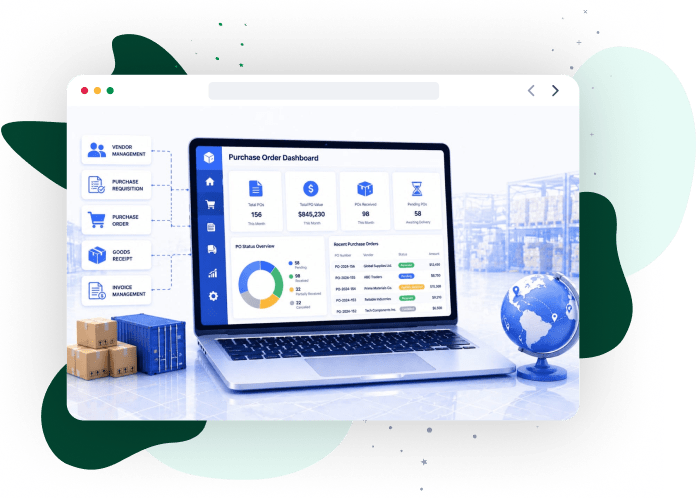

Implement a system that enforces procurement rules, maintains financial alignment, and scales transaction processing through the purchase order software platform from iCommuneTech.
Go for implementationWhat is Purchase Order Software and Why It’s Essential Today
Purchase order software executes procurement transactions by enforcing approval rules, validating request data, and recording each order against budget and accounting structures. It becomes essential when manual processes fail to control approvals, maintain consistency, or track financial commitments.
Manual procurement uses spreadsheets and email routing, where approvals bypass defined thresholds and records diverge across teams. This creates unauthorized spending, inconsistent transaction data, and missing audit records.
Modern procurement systems execute rule-based approval workflows and record each transaction against supplier and financial data through procurement software systems. These systems match purchase orders with invoices during processing, preventing discrepancies and maintaining financial accuracy.
As transaction volume increases, automated purchase order software enforces policy execution without manual routing and records each step within the transaction lifecycle. Centralized system control maintains consistency across teams and prevents fragmented data handling.
What Are the Essential Features and Capabilities of Modern Purchase Order Software?
Modern purchase order software enforces approval workflows, controls budget allocation, integrates procurement data with accounting systems, and tracks transactions in real time.
These capabilities route requests through approval hierarchies, validate spend against budgets, sync data with financial systems, and track procurement across cost centers.
As part of broader supply chain management software, purchase order systems link procurement with inventory, finance, and supplier processes through shared transaction data. The following sections define how each capability controls execution, validates financial data, and tracks procurement activity at the transaction level.
How Do Automated Purchase Order Approval Workflows Work?
Automated approval workflows route purchase requests to predefined approvers based on value thresholds, cost centers, and policy rules. The system evaluates each request against approval criteria and triggers sequential or parallel authorization steps without manual routing.
Manual purchase order processing takes 2–3 days, while automated workflows complete approvals within hours, reducing procurement cycle time (IBM). Workflows record each approval step against user roles and policy criteria through procurement process optimization, maintaining a complete audit trail. The system validates budget limits and account mappings before approval, preventing unauthorized commitments.
How Do Budget Management and Spend Controls Work in Purchase Order Software?
Budget management validates each purchase request against allocated limits before approval. The system links every request to a defined budget source and blocks transactions that exceed available funds.
Role-based access controls assign spending authority to specific users and cost centers, restricting who can initiate or approve procurement transactions. The system flags requests that exceed limits or approach predefined thresholds during submission and approval, preventing unauthorized or excessive spend before financial commitment.
Integration with supply chain analytics systems records budget utilization across departments and cost centers, tracking spend allocation and variance at the transaction level.
How Does ERP Integration Enable Seamless Accounting and Reporting in Purchase Order Software?
ERP integration transfers purchase order data to accounting systems at the point of approval. The system posts cost allocation, supplier details, and account codes directly to financial records without manual entry.
Each transaction updates accounting records in real time, removing duplicate data handling between procurement and finance functions and eliminating reconciliation delays.
Integration across procurement, accounting, and reporting systems maintains a single transaction dataset, ensuring that each purchase order is reflected in financial statements and audit records. Financial teams use transaction-level data to generate reports, track spend allocation, and verify procurement activity against accounting records.
How Does Automated Purchase Order Creation and Document Management Work?
Automated purchase order creation converts approved requisition data into purchase orders using predefined templates. The system populates supplier details, item specifications, pricing, and account mappings without manual entry.
Document management records each purchase order revision, attachment, and status change against the transaction, maintaining version history and preventing data inconsistencies.
Integration with automated order system workflows standardizes purchase order formats and data fields, replacing spreadsheet templates and email-based document exchange. The system validates input data and controls document updates, ensuring that each purchase order contains complete and consistent transaction information.
How Does Real-Time Spend Tracking and Analytics Work in Purchase Order Software?
Real-time spend tracking updates purchase order status, invoice matching, and supplier commitments as transactions progress. Each update adjusts total procurement spend immediately, maintaining current financial records.
Analytics systems group transaction data by cost center, supplier, and time period, tracking spend distribution, outstanding commitments, and invoice matching without manual consolidation.
Integration with supply chain visibility tools displays procurement metrics through dashboards that track order status, matched invoices, and committed spend in real time. Teams use this data to detect variances, review pending liabilities, and control spending against available financial capacity.
How Does Purchase Order Software Integrate Into the Procure-to-Pay Process?
Purchase order software connects procurement transactions with invoicing, accounts payable, and supplier systems within a unified execution flow. Each transaction flows across systems using shared data structures, eliminating manual data transfer.
The system maintains continuity between procurement and financial records by linking purchase order data with invoice processing and payment records, ensuring transaction-level accuracy.
As part of digital transformation in the supply chain, organizations deploy connected systems that standardize data movement across the procure-to-pay cycle. The following sections define how integration operates across system touchpoints, transaction conversion, and supplier coordination.
How Does Procure-to-Pay System Integration Work?
Procure-to-pay integration connects purchase order processing, invoice handling, accounts payable, and supplier portals through direct system interfaces. Each system updates a shared transaction record, eliminating manual data duplication.
Purchase order data maps to invoice records during processing, validating quantities, pricing, and supplier terms before accounts payable processes the invoice. This prevents discrepancies during financial posting. Integration with order management software systems coordinates transaction flow across procurement and fulfillment stages using a single data record.
Validation controls match invoices against approved purchase orders and supplier records, preventing fraud and incorrect payments. Continuous data exchange removes reconciliation steps and shortens processing cycles.
How Does PO to Invoice Conversion Automation Work?
Purchase order (PO) to invoice conversion automation matches invoice data with approved purchase orders using predefined criteria. The system checks quantities, pricing, and supplier terms before routing the invoice for reconciliation. Invoices that meet matching criteria proceed directly to reconciliation. Mismatches flag exceptions, isolating variances for review without interrupting validated transactions.
Integration with eprocurement platforms maintains a direct reference between purchase orders and invoices, linking each invoice to an approved transaction record. The system connects invoice outcomes to validated purchase orders, preventing incorrect processing and maintaining audit records.
How Do Supplier Management and Collaboration Tools Work in Purchase Order Software?
Supplier management tools store supplier records, including contract terms, compliance status, and transaction history, supporting consistent supplier selection and evaluation during procurement execution.
Collaboration tools handle transaction-level communication between procurement teams and suppliers. Order confirmations, document exchanges, and status updates link directly to active purchase orders, replacing external communication channels.
Integration with a vendor management system measures supplier performance using metrics such as delivery variance, fulfillment accuracy, and response time, enabling ongoing evaluation.
Onboarding workflows collect required supplier data and validate compliance criteria before activation, restricting procurement transactions to approved suppliers. The following sections define how system requirements vary across small businesses, growing teams, and enterprise environments.
Driving Measurable Results Across Industries
From automating manual calculations to modernizing legacy infrastructure, we build software that directly impacts the bottom line. Our custom solutions consistently reduce operational costs and accelerate process efficiency.
View Our Case Studies
How Do You Choose Purchase Order Software Based on Business Size and Needs?
Purchase order software selection depends on transaction volume and system complexity. The selected system must fit the operational scale without introducing configuration overhead.
Requirements differ across business segments. Smaller teams adopt systems with minimal setup, while larger organizations require support for regulatory controls and multi-system coordination.
As part of supply chain planning solutions, purchase order systems align with planning and resource allocation structures. The following sections define requirement differences across business stages.
How Do Small Businesses Choose the Best Purchase Order Software?
Small businesses choose purchase order software based on transaction volume, cost constraints, and ease of deployment. The system must handle order creation and tracking without complex configuration.
Lightweight tools support rapid deployment at lower cost, replacing spreadsheet-based tracking with structured records and reducing manual effort. Integration with an inventory management system links purchase activity with stock levels, improving order accuracy.
As transaction volume or integration needs increase, standard tools limit processing capacity and system coordination. Tailored solutions extend capability to support higher transaction loads and advanced integration.
How Do Enterprise Purchase Order Management Systems Operate?
Multi-Entity Scalability
Enterprise purchase order management systems handle high transaction volumes across multiple entities and jurisdictions by enforcing centralized control over procurement execution. The system manages cross-entity procurement and jurisdiction-specific requirements within a unified structure.
Regulatory Policy Enforcement
Large-scale environments enforce regulatory policies and audit controls at the transaction level. Each purchase order complies with defined standards across regions and business units.
Cross-System Integration
Integration with supply chain compliance systems validates policies and audit controls across procurement transactions. Enterprise systems coordinate data exchange between procurement, finance, and operational functions, maintaining consistent transaction records across entities.
How Do Entry-Level Purchase Order Solutions Support Fast-Growing Teams?
Entry-level purchase order solutions handle increasing transaction volume with predefined processing structures and limited configuration. These systems introduce controlled execution without requiring extensive system setup.
Growing teams use these solutions to standardize transaction handling as operational load increases. The system must maintain consistency as order volume expands across departments.
Platforms connected with digital inventory systems link purchase activity with stock records, supporting accurate replenishment during expansion. Constraints appear when transaction complexity exceeds predefined system capabilities. At this stage, systems require extension to support broader operational requirements.
What Are the Best Purchase Order Software Solutions?
The best purchase order software solutions handle increasing transaction volume, support required functionality, and scale without limiting system configuration. Selection depends on how a platform processes transactions, integrates with existing systems, and adapts to operational requirements.
Organizations evaluate solutions based on vendor capability, system architecture, and deployment model. These factors define long-term system performance under changing operational demands.
As part of supply chain solutions, purchase order systems function within connected operational environments that shape platform selection. The following sections define solution types, comparison criteria, and cost structures used to evaluate purchase order software.
How Do Top-Rated Purchase Order Software Solutions Differ?
Top-rated purchase order software solutions differ by deployment model, certification standards, and industry focus, which determine how each platform supports specific operational needs.
SaaS-based solutions standardize deployment and provide subscription-based access, while industry-specific platforms enforce compliance controls and sector-specific configurations. Enterprise vendors support certification frameworks and audit requirements for regulated environments.
Integration with vendor management tools adds supplier evaluation and performance metrics as part of solution differentiation.
How Do PO Solutions Differ for Small Business Versus Enterprise?
Purchase order solutions differ by pricing structure, system configuration, and implementation approach based on business scale. Solutions built with custom inventory solutions address organization-specific needs that standard configurations cannot support.
The following table compares how small business and enterprise solutions handle cost, configuration, feature scope, implementation, and system extension.
| Criteria | Small Business Solutions | Enterprise Solutions |
|---|---|---|
| Pricing Model | Fixed subscription pricing | Scales based on users, modules, and scope |
| Configuration | Uses predefined setup with limited customization | Applies configurable architecture with multiple control layers |
| Feature Scope | Covers core procurement functions | Supports complex, multi-entity operations |
| Implementation | Follows standard setup with minimal configuration | Executes structured rollout with staged deployment |
| System Extension | Limits adaptability to predefined features | Enables organization-specific extensions |
How Do Free Versus Paid Purchase Order Software Options Differ?
Free, freemium, and paid purchase order software options differ by cost structure, feature access, system control, and scalability. Integration with supply chain security systems applies data protection and compliance controls across procurement operations.
The following table compares how free, freemium, and paid solutions handle cost, features, configuration, usage limits, support, scalability, and risk.
| Criteria | Free / Open Source Solutions | Freemium Solutions | Paid Solutions |
|---|---|---|---|
| Cost Structure | Requires internal setup without license cost | Provides a free tier with upgrade thresholds | Uses subscription or license-based pricing |
| Feature Scope | Limits functionality to basic modules | Restricts features until upgrade | Provides full feature access with configuration options |
| Configuration | Requires internal development or setup | Allows limited configuration options | Supports configuration based on business requirements |
| Usage Limits | Depends on internal capacity without formal limits | Limits users, transactions, or documents | Removes operational limits within licensed scope |
| Support | Relies on community or internal support | Provides limited support in the free tier | Delivers dedicated vendor support and service agreements |
| Scalability | Depends on internal resources for expansion | Restricts scaling until upgrade | Supports expansion across operations |
| Risk Factors | Introduces maintenance dependency and security exposure | Creates a feature and upgrade dependency | Maintains a controlled environment with structured support |
What Are the Alternatives to Purchase Order Software?
Alternatives to purchase order software include spreadsheet-based tracking, open source tools, and custom-built systems, each offering different levels of cost, system control, and scalability.
Organizations assess these options based on total cost of ownership, support availability, and compliance requirements. Each option limits automation, data control, or scalability compared to dedicated purchase order software.
As part of stock inventory control systems, procurement tracking methods affect how inventory and purchasing data are recorded and managed. The following sections compare spreadsheet-based tracking, open source tools, and custom systems based on functionality, limitations, and operational fit.
How Does Excel and Spreadsheet-Based Purchase Order Management Work?
Excel and spreadsheet-based purchase order management stores procurement transactions in manually maintained files. Users enter and update order details, status changes, and financial data manually for each transaction.
Multiple users update separate file versions, creating inconsistent records and removing a single source of truth. Changes do not maintain structured history or user-level traceability, limiting audit control.
As transaction volume increases, spreadsheets cannot manage large data sets or support reliable reporting. Integration with inventory database systems replaces manual files with structured data storage and controlled access. Organizations replace spreadsheets when data errors, tracking gaps, and audit limitations disrupt procurement accuracy.
How Do You Evaluate Open Source Purchase Order Software?
Evaluate open source purchase order software based on internal ownership of deployment, maintenance, and system control. Integration with supply chain security solutions requires defined controls for access management and data protection.
The following criteria define how open source solutions handle support, security, compliance, maintenance, and scalability.
- Support model: Relies on internal teams or community support without service guarantees.
- Security control: Requires internal management of access restrictions, patch updates, and data protection.
- Compliance: Requires internal processes to maintain audit records and meet regulatory requirements.
- Maintenance: Requires continuous effort for updates, issue resolution, and system stability.
- Scalability: Depends on internal resources to extend system functionality.
When Should You Choose Custom Purchase Order Software by iCommuneTech?
Choose custom purchase order software when standard systems cannot execute required workflow logic or meet industry-specific constraints. Organizations with non-standard approval conditions or specialized processes require tailored system configuration.
Regulated environments enforce audit controls and jurisdiction-specific rules at the transaction level. Standard systems cannot implement these conditions without modification.
Complex integration scenarios require custom interfaces to connect procurement with enterprise resource planning (ERP) and financial systems. These integrations handle controlled data exchange between systems.
iCommuneTech delivers implementation-focused solutions that configure procurement systems to match business processes and compliance requirements. Explore tailored capabilities through a custom inventory demo.
How Does Purchase Order Software Deliver Measurable ROI?
Purchase order software delivers ROI by preventing invoice discrepancies, reducing manual processing time, and controlling procurement costs.
Top-performing organizations reduce the cost of ordering materials and services by up to 52% (IBM). Integration with inventory optimization systems aligns procurement with demand, preventing excess purchasing and improving cost allocation.
Why Choose iCommuneTech for Purchase Order Software Implementation?
You choose iCommuneTech when procurement systems must execute defined process conditions without relying on fixed configurations. iCommuneTech configures purchase order systems based on your approval rules, data structures, and compliance requirements. System behavior reflects your operational logic at the transaction level.
Integration extends to enterprise resource planning (ERP), financial platforms, and supplier systems through controlled interface design. Systems built through supply chain automation services maintain execution consistency and enforce audit requirements across procurement operations.
You receive implementation support from system setup through deployment, ensuring that the system operates according to defined conditions.