
Perfex CRM Customization
How a Cloud PBX Provider Turned Perfex CRM Into Its Billing and Support Platform
StarlinqPBX could not bill from the invoice reports in its CRM, and its click-to-call Chrome extension kept failing for users who call all day. Request by request, we extended Perfex CRM with invoice reporting, online payments, auto-invoicing, SMS, and ticketing, and made the extension reliable.
- Business users on the platform
- 10,000+
- Extension reinstalls, down from every 1–2 days
- 0
- Delivery cycles, request by request
- 8
Client Overview
Client Story
StarlinqPBX is a cloud-based hosted PBX and VoIP phone service based in San Fernando, California, founded by Arman Garibyan. Its platform serves 10,000+ business users, from small offices to mid-market companies, each with its own services, devices, and phone numbers. The company ran its customer operations on Perfex CRM, with a Chrome extension that lets users click to call or email straight from their browser.
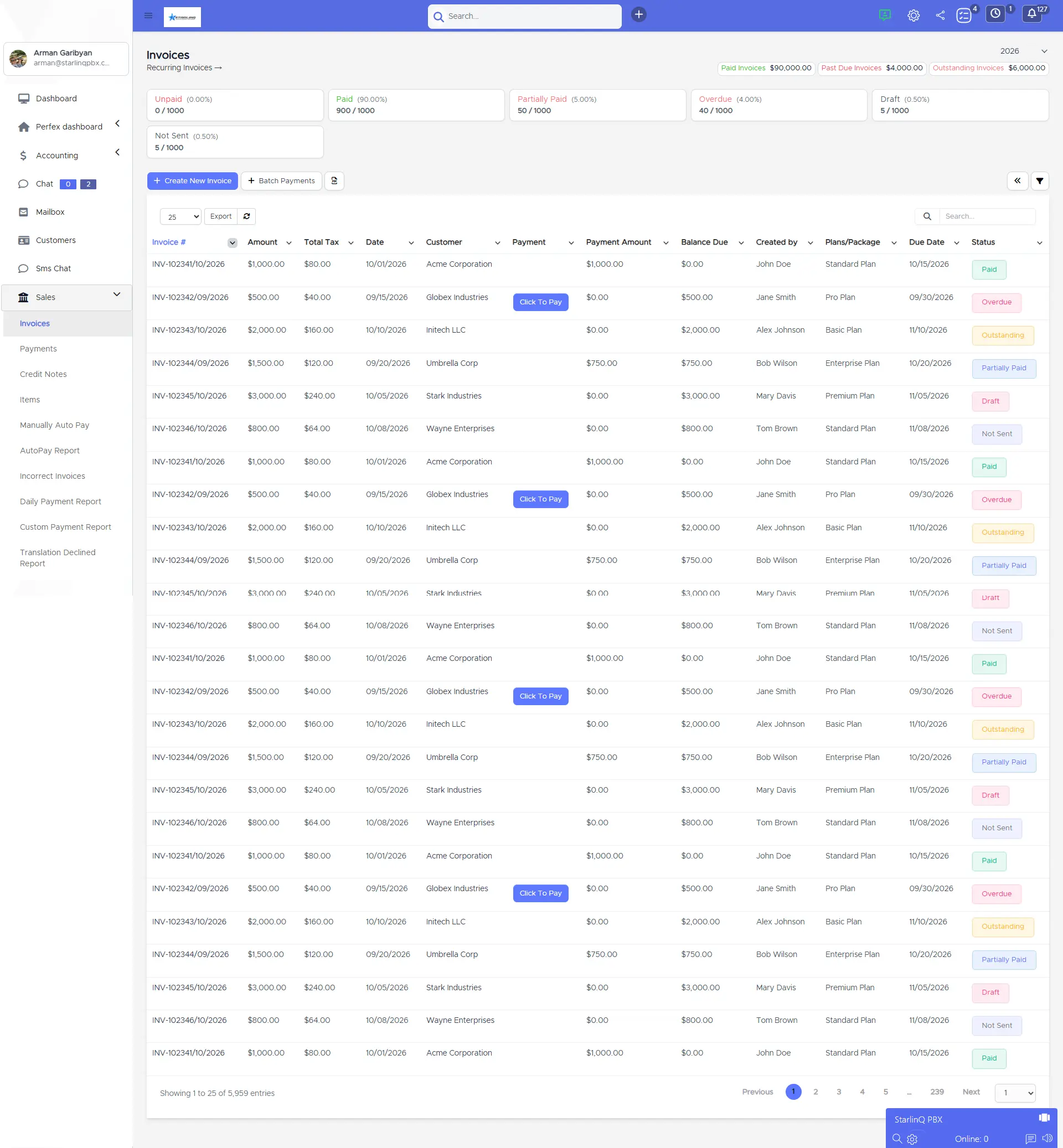
The first problem was money. The invoice reports in the CRM did not match how StarlinqPBX bills, so revenue was tracked through workarounds, and invoices could not be paid inside the system that raised them. Monthly invoices were created by hand, support tickets were routed by hand, and nobody could see at a glance which services, devices, and numbers a customer held. Meanwhile, the extension’s background process went to sleep every day or two, so users had to uninstall, reinstall, and grant permissions again before they could make a call. At one client, around 15 users were hit at once.
Background
Project Background
Arman needed the CRM the business already used to handle billing, customers, and support at its scale, and the extension to work every day. The brief:
- Invoice Reports They Can Bill From
- The first and main ask, with everything else built around it.
- Collect Payments in the CRM
- Online payment on the invoices the CRM raises.
- A Full Record per Customer
- Services, plans, devices, and phone numbers in one place.
- A Reliable Calling Extension
- Correct identity, settings that save, and no daily reinstalls.
The reports were the first thing we needed: we couldn’t bill off what we had. Then every few weeks something else came up: a module we needed, a setting that wouldn’t save, an extension that stopped working for a client. The job was never one big build; it was fixing the next thing that got in the way.

Discovery
Research & Ideation
StarlinqPBX did not need a new CRM. It needed the one it had to fit how a PBX business bills, supports, and calls, one request at a time.
Billing First
Invoice reporting was the first cycle, because every other module depends on knowing what to bill.
Extend, Don’t Replace
New modules plug into Perfex CRM’s existing flows, so the team keeps working the way it already does.
Fix What Gets in the Way
Each live issue from a client became the next piece of work, delivered as soon as it was reported.
Design
Designing a Billing-Ready Customer Lifecycle
Every customer now moves through five connected steps inside the same CRM.
- Customer and ServicesPlans, devices, and phone numbers
- Monthly InvoiceGenerated from subscriptions
- Online PaymentCollected through Authorize.net
- SupportAuto-assigned tickets and SMS
- ReportsInvoices, tax, gross and net profit
Manual invoicing stays available beside auto-generation, for anything that falls outside a subscription.
Challenges
Project Challenges
Invoice Reports They Couldn’t Bill From
Reports did not match how StarlinqPBX invoices and tracks revenue.
No Payment Gateway
Invoices raised in the CRM could not be paid inside it.
Manual Monthly Invoicing
Every invoice was created by hand from customer data and subscriptions.
No Per-Customer Service Record
No place to track each customer’s services, devices, and phone numbers.
No SMS, Manual Ticket Routing
No internal or client SMS, and tickets had to be assigned by hand.
Missing Plans, Reports, and Profile Tools
No three-tier plans, tax or profit reports, document storage, or customer profile actions.
Wrong Identity in the Extension
Profiles showed device names, caller ID used the wrong number, and calls always used the first profile.
An Extension That Kept Failing
Repeated logins, settings that would not save, and a background process that stopped every day or two.
Approach
Our Solutions
We extended the existing Perfex CRM (CodeIgniter) and Chrome extension, starting with the reports the business bills from.
Invoice Management and Reports
Detailed invoice management and reports built to match how StarlinqPBX bills.
Authorize.net Payments
Customers pay invoices inside the CRM through the Authorize.net gateway.
Monthly Auto-Invoicing
Invoices generate from customer data and subscriptions, with manual invoicing still available.
Service, Device, and Number Tracking
Each customer record holds its services, service counts, devices, and phone numbers, with three plan tiers per service.
SMS and Auto-Assigned Tickets
Two-way SMS for staff and clients, and tickets from the customer portal assigned to employees automatically.
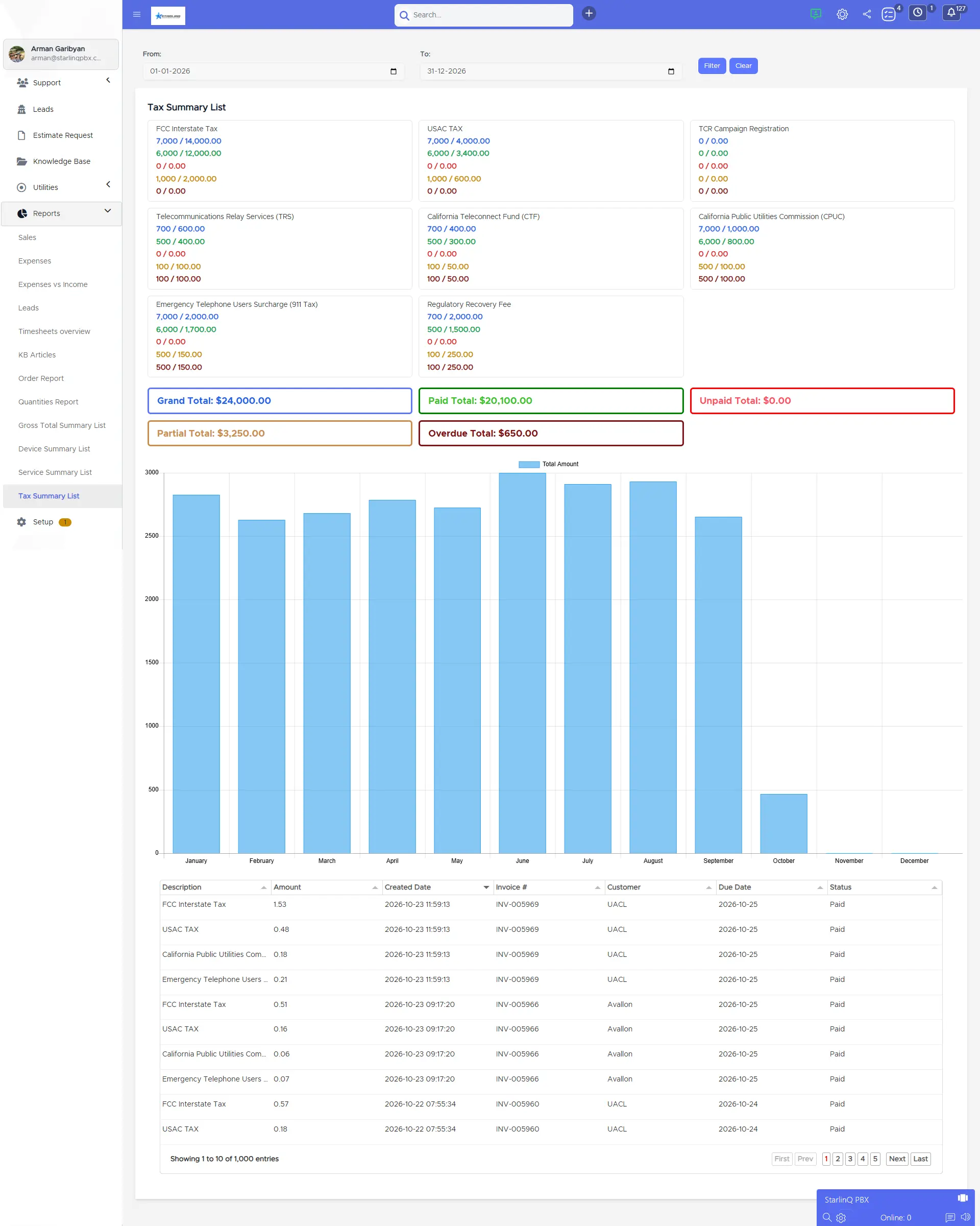
Reporting and Customer Profile Suite
Device, service, tax, and gross and net profit reports, plus eight customer profile actions, built from scratch.
Customer Portal File Manager
Customers upload and store their important documents in the portal.
Every Outbound Call Shows Its Profile
Users with several profiles used to call from the first one without knowing it. Now a popup shows each profile as company code plus extension, so two people named Adam are never confused, and the user can switch before dialing.
- Main Office 12345*202 Selected
- Main Office 12345*205 Profile 2
- Branch Office 67890*101 Profile 3
What Was Added to Perfex CRM and the Extension
-
Billing 5 items
- Invoice reports
- Authorize.net
- Auto-invoicing
- Taxation report
- Gross and net profit
-
Customers 5 items
- Service tracking
- Device and number tracking
- Three-tier plans
- Devices list report
- Services list report
-
Communication 4 items
- Staff SMS chat
- Two-way client SMS
- Portal tickets
- Ticket auto-assignment
-
Customer Profile 8 items
- Add Payment Profile
- Customer Admins
- Add Device
- Delete Device List
- Chrome Filter
- Add Service
- Account Summary
- Add Group
-
Customer Portal 1 item
- File manager
-
Chrome Extension 11 items
- Company and extension names
- DID caller ID
- Profile picker
- Save-once settings
- Reset to Default
- Logout
- Always-on service worker
- Click 2 Call fix
- Click 2 Email fix
- Auto Call fix
- Guarded token refresh
Delivery Cycles
- Invoice Reporting and Payments
- Customer Records and Auto-Invoicing
- SMS and Ticketing
- Three-Tier Service Plans
- Reports and Customer Profiles
- Portal File Manager
- Chrome Extension Updates
- Stabilization and Client Fixes
Delivered in intermittent cycles between May 2023 and October 2025, one requirement at a time, not as a continuous build.
Custom Features
Custom Functionalities
The Chrome extension changes that turned a daily frustration into a tool users can rely on.
Company Code Plus Extension
Profiles display as company code and extension, not device names, so duplicate names no longer collide.
Caller ID From the Company’s DID
Outbound calls use the servicing company’s DID number, and the column is now labeled DID Number.
Save-Once Settings
The first login imports settings and the default profile, and later changes save without signing in again.
Reset to Default and Logout
Users refetch defaults from the server and switch users between PCs without getting stuck in a session.
An Always-On Service Worker
The background process stays active, so Click 2 Call works without uninstalling and re-granting permissions.
Guarded Token Refresh
Auto-fetch turns itself off when call history gets no new data within an hour, avoiding pointless token pulls.
Support
On Going Support
StarlinqPBX worked with iCommuneTech through staff augmentation from May 2023 to October 2025, returning in cycles as new modules were needed and live issues came up.
Request by Request
Each cycle covered what the business needed next, with no large fixed scope to wait on.
Fixes for Live Problems
Client-reported extension issues, including one affecting about 15 users at once, were fixed as they surfaced.
Capacity When It Was Needed
Developers joined StarlinqPBX’s work for each cycle, so the team grew and shrank with the workload.
They stuck with us through two and a half years of requests: reports, modules, and a hundred extension fixes. The invoice reporting they built first is still what we run the business on. Easy to work with, and they understand how a PBX business runs.
Impact
Project Outcome
- Support tickets routed by hand, now auto-assigned
- 0
- Plan tiers for every service
- 3
- Extension reinstalls needed, down from every 1–2 days
- 0
- Delivery cycles, each scoped to a new requirement
- 8
Figures from the delivered work.
Before: workarounds around the CRM
- Invoice reports that did not match billing
- Invoices raised by hand and paid elsewhere
- Tickets routed manually, no SMS
- An extension that needed reinstalling every day or two
After: a CRM the business runs on
- Invoice reports built for how StarlinqPBX bills
- Monthly auto-invoices paid through Authorize.net
- Auto-assigned tickets and two-way SMS
- An extension that stays active and saves settings
StarlinqPBX now bills from invoice reports built for how it actually invoices, and the founder says it still runs the business on them. Invoices generate monthly and are paid inside the CRM, and every customer record shows its services, plans, devices, and numbers.
Support tickets assign themselves, staff and clients message by SMS, and tax and profit reports come straight from the CRM. The Chrome extension stays active, shows the right identity and caller ID, and saves settings once.
How iCommuneTech Works
Understand first. Build exactly what’s needed. Stay for the long run.
We deliver the exact solution to a business problem with the least investment and time, then stay to keep it working.
We understand before we quote
We start by understanding how the work actually gets done, before we propose anything.
The exact solution, not the biggest one
We recommend the smallest solution that fully solves the problem, and use what already works.
A team that stays
Every launch includes a 90-day warranty, then an optional long-term delivery plan with the same team.
Problem Slowing Business Growth? Let’s Find the Exact Fix.
Tell us how the work gets done today. We’ll map it before we propose anything.
Connect on WhatsApp+91 97256 00878
Share your requirementsenquiry@icommunetech.com