
Attorney Referral Platform Development
How an Attorney Referral Platform Fixed Lead Routing and Protected Client Data
On LawFlip, attorneys refer cases to each other, but links went to the wrong place, client details showed before a case was shared, and reminder emails kept firing on closed leads. We fixed the referral workflow end to end in Laravel, so every notification opens the right lead and client data stays hidden until a referral is made.
- Client details shown before a case is shared
- 0
- From notification to the right lead
- 1 Click
- Automatic follow-up on stalled referrals
- 48 Hours
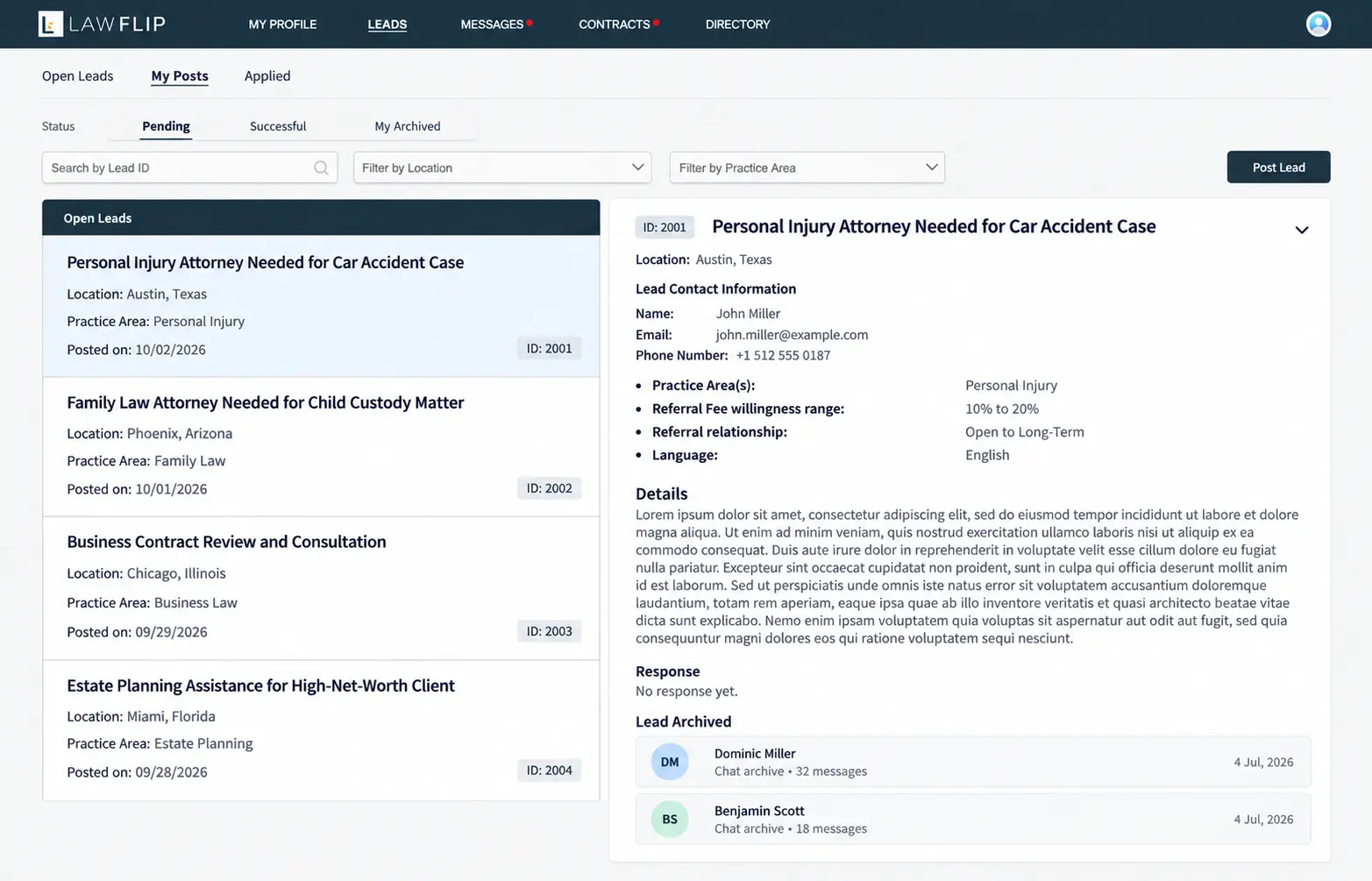
Client Overview
Client Story
LawFlip is a LegalTech platform based in West Hollywood, California, that helps people find lawyers and lets attorneys refer cases to one another. It connects 590+ attorneys with 4,000+ clients. An attorney posts a lead, other attorneys review it and accept or decline, and once a case is referred, its full details are shared with the firm that takes it. Imran Memon, founder of Sahal Softech, manages the platform and works with iCommuneTech as its white-label development team.
Day to day, that workflow kept breaking. A notification about a rejected lead opened the wrong page, so attorneys searched “My Posts” by hand to find it. Client names, contact details, and internal notes were visible before a case was officially shared, a real trust risk in legal work. Rejected attorney lists and archived sections showed to people who should not see them, PDFs in the chat could not be downloaded, and attorneys could decline a lead without saying why. Behind the scenes, the team copied lead updates into Airtable by hand, and reminder emails kept going out on leads that were already closed.
Background
Project Background
LawFlip needed its attorney-to-attorney referral workflow stable and secure, with far less manual follow-up from the admin team. The brief:
- Links That Open the Right Lead
- Every post link and notification routes straight to its lead.
- Client Data Protected Until Referral
- Sensitive details hidden until a case is officially shared.
- Clear Permissions
- Each section visible only to the people it belongs to.
- Less Manual Follow-Up
- Airtable kept in sync and reminders sent only when they matter.
We keep chasing links, checking who rejected a lead, and asking why a notification didn’t take us to the right post. The platform should show us what needs attention, not make us hunt for it.
 Imran MemonFounder, Sahal Softech
Discovery
Research & Ideation
The platform did not need a rebuild. It needed the referral workflow to behave the way attorneys already expected it to, at every step.
Fix the Path to Each Lead
If an alert is about a lead, it should open that lead. No searching.
Show Each Role Only What It Should See
Client details, rejected lists, and archives follow who posted the lead and whether a case has been shared.
Let the Pipeline Decide
Airtable’s Pipeline Stage is the source of truth, so emails stop the moment a lead is no longer under review.
Design
Designing a Secure Referral Workflow
Every lead now moves through five steps, with privacy and follow-up built into each one.
- Lead PostedClient details masked
- Attorneys ReviewNotifications open the exact lead
- Accept or DeclineDecline requires a reason
- Case ReferredFull details revealed to the firm
- Follow-Up and Sync48-hour reminders, Airtable updated
Declined leads keep a read-only chat history, so the record stays intact while messaging is closed.
Challenges
Project Challenges
Broken Lead and Notification Links
Post links and rejection alerts did not open the right lead, forcing manual searches.
Client Details Exposed Too Early
Names, contact details, internal notes, and decision fields were visible before a case was shared.
Permission Gaps
Rejected attorney lists and archived sections were visible beyond the original poster.
Incomplete Messaging
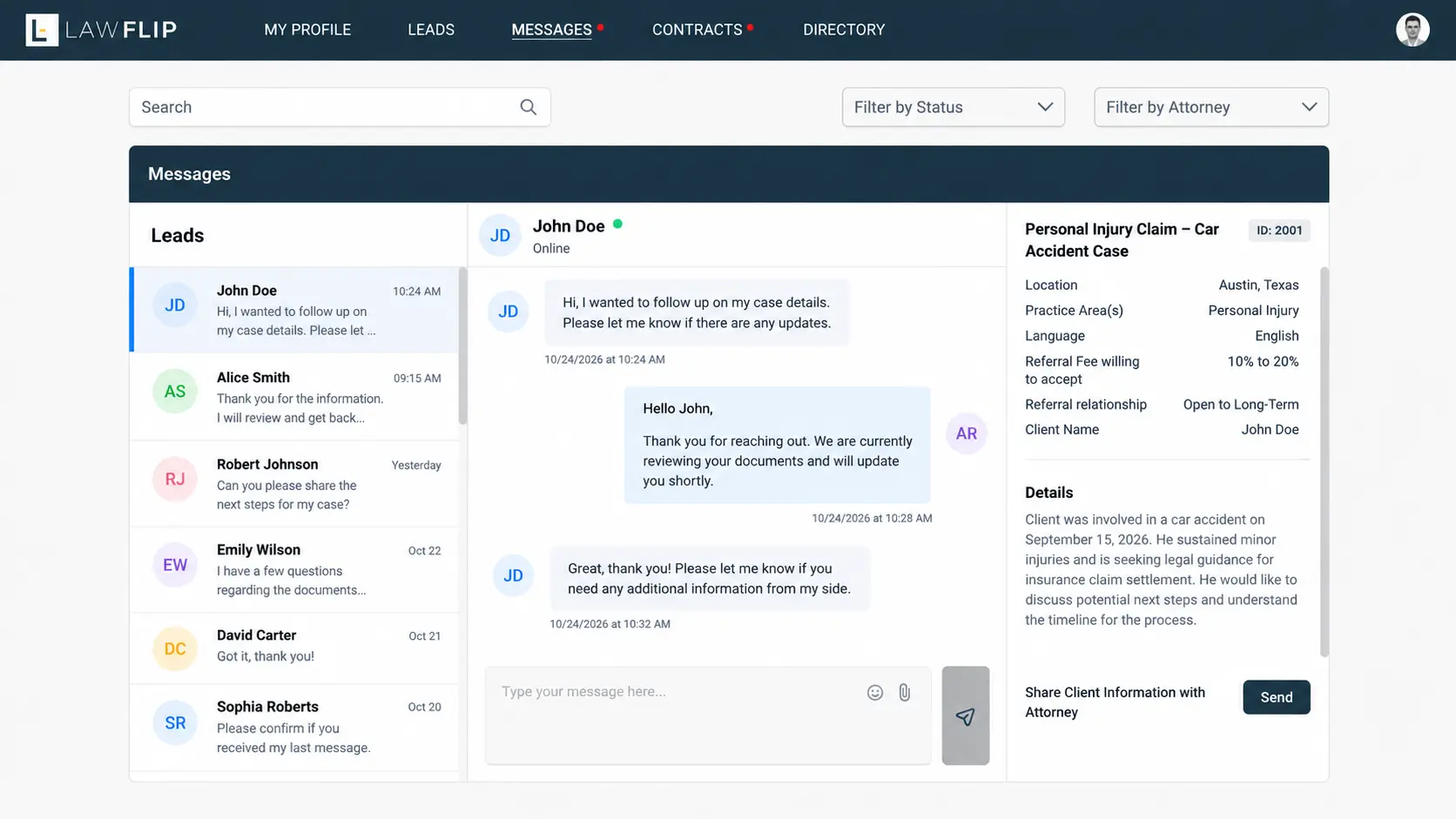
No edit, unsend, or read status, no chat access after rejection, and attachments could not be downloaded.
Unstructured Rejections
Attorneys could decline without a reason, and the team could not see who declined or why.
Manual Airtable Tracking
Lead and message details were copied into the attorney response tracker by hand.
Stalled Referrals and Unwanted Emails
Referred firms needed follow-ups, and reminders kept going out on completed leads.
Weak Admin and Registration Controls
Posting and response rights were loosely controlled, and registration had no bot protection.
Approach
Our Solutions
We fixed the existing Laravel platform in place, using Laravel Nova for admin controls and Blade for the attorney-facing screens.
Links That Open the Right Lead
Post links and rejection notifications now route to the specific lead or post.
Client Details Hidden Until Referral
Names, contacts, notes, and decision fields stay masked until a case is shared, then appear in full.
Section-Level Permissions
Rejected attorney lists, archives, lead names, and profile actions are visible only to the right users.
Complete Messaging
Edit, unsend, read and unread status, downloadable attachments, and read-only history after rejection.
Structured Rejections and Follow-Ups
Decline reasons are required and tracked, and referred firms get a reminder after 48 inactive hours.
Airtable Sync and Webhooks
Lead status syncs with Airtable, and every message sends full lead details to the tracker automatically.
Admin Roles and Bot Protection
Laravel Nova roles control who can post and respond, and Captcha blocks bot registrations.
Every Fix, Grouped by Workflow Area
-
Links and Notifications 3 fixes
- Post deep links
- Rejection alert links
- Accept and reject emails
-
Privacy and Permissions 5 fixes
- Masked contact details
- Anonymized pre-referral leads
- Lead names for owners only
- Rejected list for poster only
- Profile permissions
-
Messaging 4 fixes
- Edit and unsend
- Read and unread
- Attachment downloads
- Archived read-only chat
-
Referral Workflow 3 fixes
- Required decline reasons
- 48-hour follow-ups
- Reject Lead action restored
-
Airtable and API 3 fixes
- Pipeline Stage sync
- Message webhook
- ISO 8601 timestamps
-
Admin and Display 3 fixes
- Nova roles and permissions
- Registration Captcha
- Lead names and alphabetical attorneys
Custom Features
Custom Functionalities
The engineering decisions that make the referral workflow both private and reliable.
Masking in the View and the Backend
Client details are hidden in Blade views and blocked by backend validation, so they cannot leak through another route.
Webhook-First Message Sending
The Send Message API calls the Airtable webhook before it returns, and logs any webhook failure without blocking the message.
Pipeline Stage as Source of Truth
Reminders run only while a lead is Under Review, never once it is retained, placed, closed, or archived.
Read-Only History for Declined Leads
The conversation stays readable after a decline, while new messages are disabled.
Configurable Webhook Endpoint
The Airtable webhook is set through environment configuration, so it can change without a code change.
Timezone-Aware Timestamps
The API returns full ISO 8601 timestamps with timezone, so every system reads event times the same way.
Support
On Going Support
The solution has been delivered. A dedicated iCommuneTech resource continues to handle maintenance and support as Sahal Softech’s white-label development team.
Daily-Use Problems First
Work started with the links, alerts, and messages attorneys hit every day.
Fixed in Place
Every change was made inside the existing Laravel platform, without a rebuild or downtime for users.
Ongoing Improvements
The same dedicated resource handles new requests as the platform grows.
Thanks to the iCommuneTech team for fixing the links, notifications, permissions, and message issues our attorneys deal with daily. They continue to support us as our white-label IT team, and the platform now feels much more reliable and easier to manage.
Imran MemonFounder, Sahal Softech
Impact
Project Outcome
- Client names, contacts, or notes shown before a case is shared
- 0
- From a post link or notification to the right lead
- 1 Click
- Of rejections now recorded with a decline reason
- 100%
- Reminder emails sent on retained, closed, or archived leads
- 0
Figures from the delivered changes.
Before: a workflow attorneys worked around
- Alerts that opened the wrong page
- Client details visible before referral
- Declines with no reason recorded
- Airtable updated by hand, reminders on closed leads
After: a workflow that leads the way
- Every alert opens the exact lead in one click
- Client details revealed only after a case is shared
- Every decline carries a reason the team can see
- Airtable synced automatically, reminders only when needed
Attorneys now go from a notification straight to the lead it is about, and client details stay hidden until a case is officially shared. Rejected lists and archives are visible only to the people they belong to.
Every decline is recorded with a reason, stalled referrals get an automatic 48-hour follow-up, and Airtable stays in sync without manual entry. Captcha keeps bots out of registration, and attachments in chat download in one click.
How iCommuneTech Works
Understand first. Build exactly what’s needed. Stay for the long run.
We deliver the exact solution to a business problem with the least investment and time, then stay to keep it working.
We understand before we quote
We start by understanding how the work actually gets done, before we propose anything.
The exact solution, not the biggest one
We recommend the smallest solution that fully solves the problem, and use what already works.
A team that stays
Every launch includes a 90-day warranty, then an optional long-term delivery plan with the same team.
Problem Slowing Business Growth? Let’s Find the Exact Fix.
Tell us how the work gets done today. We’ll map it before we propose anything.
Connect on WhatsApp+91 97256 00878
Share your requirementsenquiry@icommunetech.com