
Google Sheets Add-on Development
How a Google Sheets Add-on Let 550+ Users Pull API Data Without Writing Code
Getting API data into Google Sheets used to mean reading API docs, handling credentials, and writing Apps Script. We built Phlorin, a Google Sheets add-on where users pick an API, set it up once, and let it refresh on a schedule, with an AI chatbot to ask questions about the results.
- Users and installs
- 550+
- Ready-made API integrations at delivery
- 40+
- From idea to delivery
- 4 Months
Client Overview
Client Story
Phlorin is an API connector and data automation tool for Google Sheets, operated by Phlorin, LLC in New Jersey. Imran Memon, founder of Sahal Softech, led the product and brought iCommuneTech in to build it from scratch.
The people Phlorin serves already live in spreadsheets: analysts, marketers, and operators who want numbers from Shopify, HubSpot, Stripe, or GA4 next to their own data. Most of them already have the API key and the endpoint. What stops them is everything in between: reading API documentation, working out authentication headers, writing Apps Script, and pasting JSON into cells. Then they repeat it all every time they need fresh numbers, so their sheets go stale between manual runs. For anyone who does not code, API data in Sheets was out of reach.
Background
Project Background
The idea was simple to say and hard to build: get API data into Sheets without code. The brief:
- Many APIs, One Add-on
- Popular services and custom APIs from a single tool inside Sheets.
- Set Up Once, Run Again
- Saved requests instead of rebuilding the same call every time.
- Data That Stays Current
- Scheduled refreshes, with control over where results land.
- A Product Ready to Sell
- Plans that set limits on requests, scheduling, OAuth, and support.
People have the API key and the endpoint, but they still can’t get the data into their sheet without writing code. It should just be a request they set up once and can run again.
 Imran MemonFounder, Sahal Softech
Discovery
Research & Ideation
Every API asks for something different: its own authentication, endpoints, methods, headers, and response format. The add-on had to hide that variety without limiting it.
Guide the Common Cases
For known APIs, show only the fields that API needs, so setup feels like filling a short form.
Allow the Uncommon Ones
A custom connector covers any REST API outside the list, with full control over method, headers, and parameters.
Turn Requests Into Workflows
Once a request works, save it, schedule it, and never build it again.
Design
Designing an API Workflow Inside the Spreadsheet
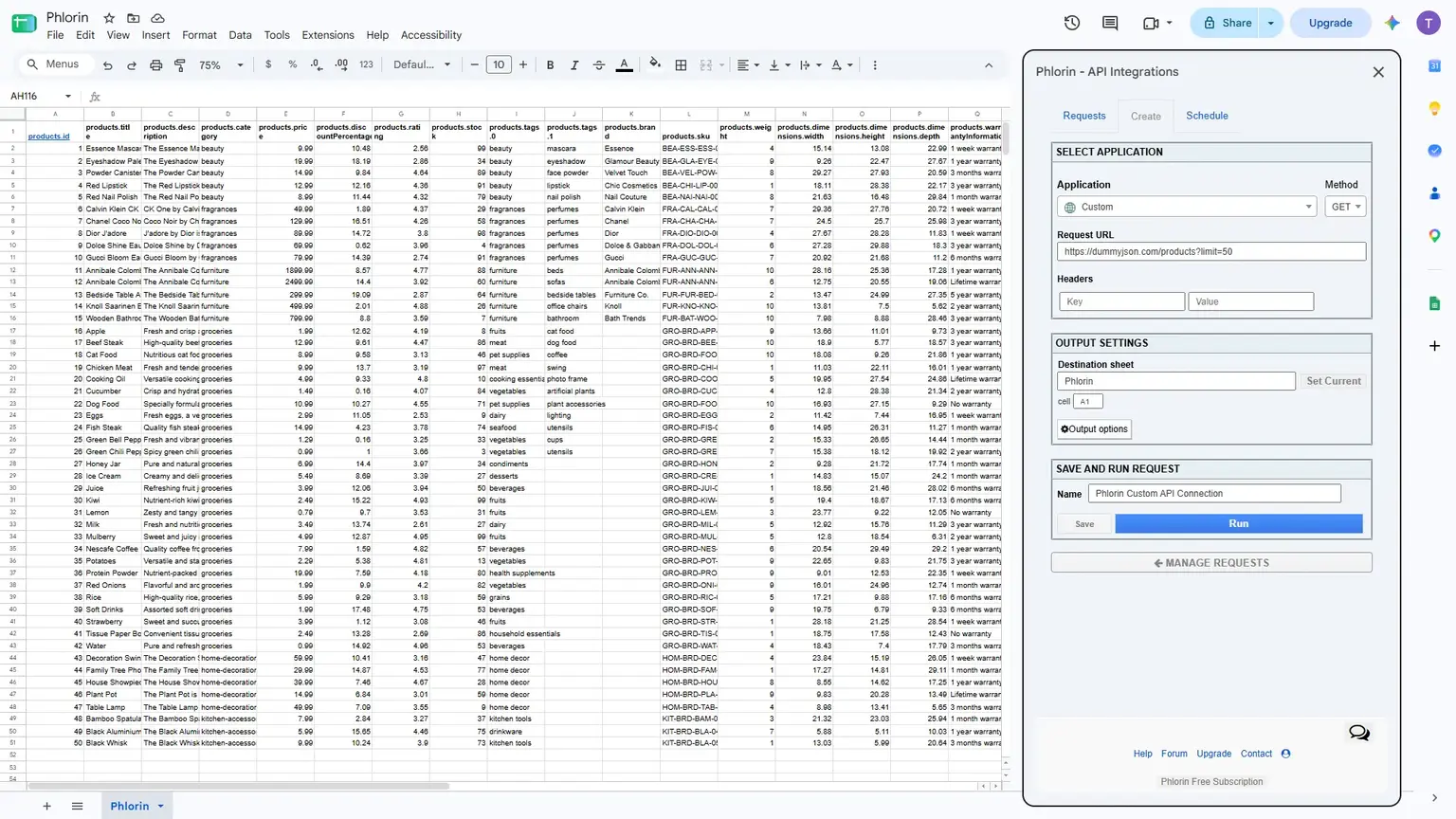
Users never leave Google Sheets. Every request follows the same five steps in the Phlorin panel.
- Choose an APIFrom the list, or Custom API
- Configure the RequestKey, method, headers, parameters
- Pick the DestinationSheet, cell, overwrite or append
- Save the RequestRun, schedule, edit, or delete
- Refresh and AskScheduled runs and an AI chatbot
One Request, Set Up Once
A saved request holds everything needed to run it again: the API, where its results go, how they are written, and when it refreshes.
- API Shopify
- Destination Orders!A1
- Output mode Append
- Schedule Daily
Challenges
Project Challenges
Many APIs, One Tool
Users needed a single add-on for multiple services, not one tool per API.
Every API Is Built Differently
Authentication, endpoints, HTTP methods, headers, parameters, and response formats all vary.
APIs Outside Any List
Users also needed to connect services no predefined integration covered.
Repeated Configuration
Rebuilding the same request for every refresh added manual work each time.
Control Over Spreadsheet Data
Users needed to choose where results land and whether old data is replaced or kept.
Stale Data Between Runs
Without scheduling, sheets were only as current as the last manual run.
Different Plans, Different Limits
Users needed different request limits, scheduling, OAuth access, and support levels.
Raw Responses Are Hard to Read
API data landed in Sheets with no easy way to analyze or ask questions about it.
Approach
Our Solutions
We built Phlorin as a Google Sheets add-on on Google Apps Script and Firebase, keeping the whole API workflow inside the user’s spreadsheet.
A Native Google Sheets Add-on
Phlorin opens inside Sheets and acts as the bridge between the spreadsheet and external APIs.
Predefined Integrations With Guided Setup
40+ ready-made integrations at delivery, each showing only the fields that API requires.
Custom API Connector
Any REST API by URL, with GET, POST, PATCH, PUT, or DELETE, multiple headers, and parameters.
Destination and Output Mode
Results go to a chosen sheet and cell, and either overwrite old output or append to it.
Saved Requests
Named configurations users can run, schedule, edit, or delete instead of rebuilding.
Scheduled Refreshes
Saved requests run on their own: daily on applicable plans and hourly on the Team plan at delivery.
AI Chatbot for Sheet Data
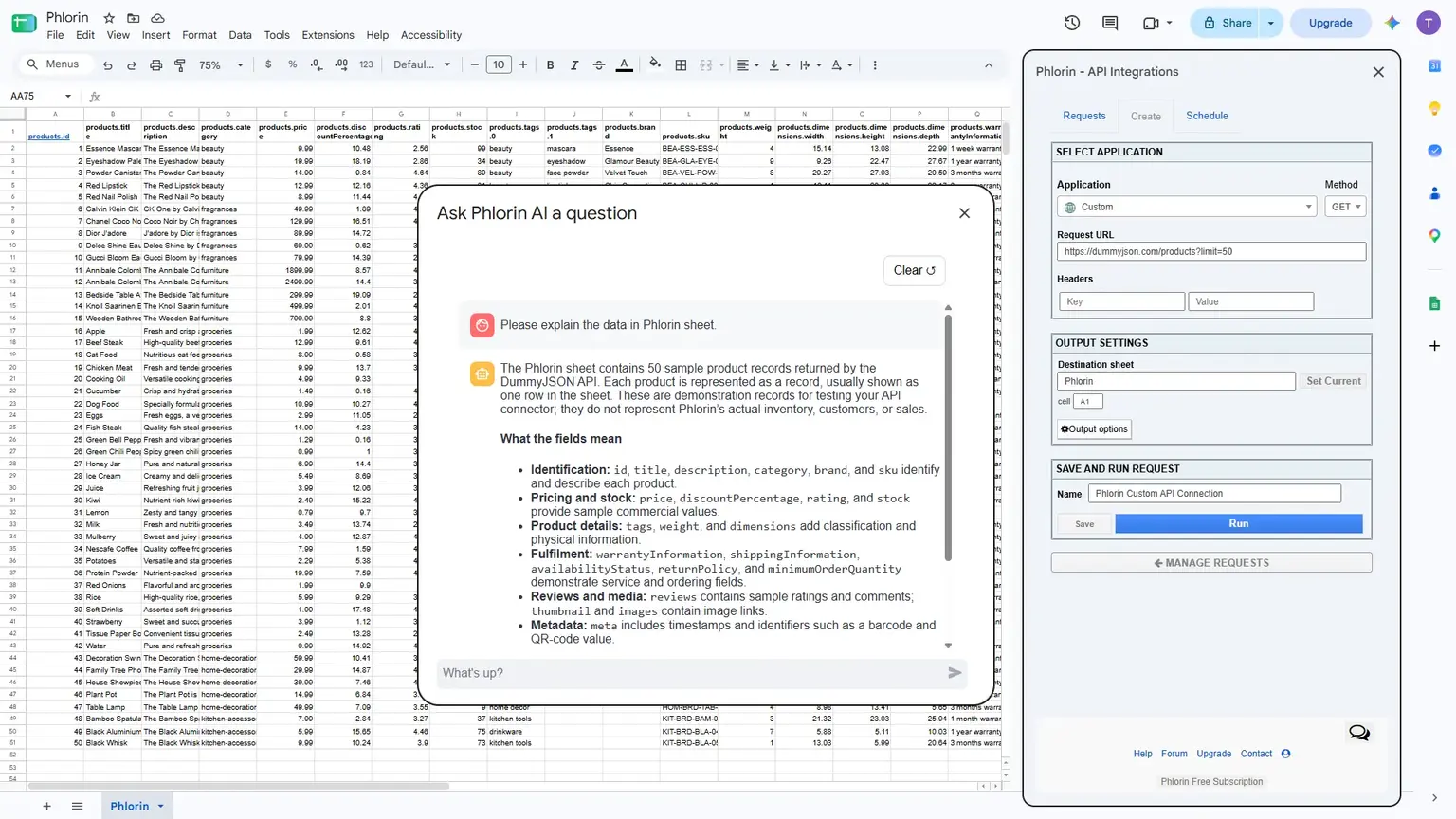
An AI chatbot built on Ollama lets users ask questions about their data instead of reading raw output.
Plans and User Management
Firebase manages subscriptions and gates request limits, saved requests, scheduling, and OAuth by plan.
Ready-Made Integrations, Plus Any REST API
-
CRM and Sales
- HubSpot CRM
- Salesforce
- Zoho CRM
-
Ecommerce and Payments
- Shopify
- WooCommerce
- Stripe
-
Marketing and Analytics
- Mailchimp
- Google Analytics 4
- Google Search Console
- YouTube Analytics
-
Productivity and Dev
- Airtable
- Notion
- Google Calendar
- GitHub
-
AI and Market Data
- OpenAI
- CoinMarketCap
- ExchangeRate-API
- AccuWeather
-
Custom API Any REST API
- GET
- POST
- PATCH
- PUT
- DELETE
Implementation Timeline
- Discovery and Add-on Setup
- Predefined Integrations
- Custom API Connector
- Destination, Output Mode, and Saved Requests
- Scheduling, OAuth, and Subscriptions
- Pagination, Multi-Query, and AI Chatbot
Followed by rounds of client feedback, with delivery in about 4 months.
Custom Features
Custom Functionalities
The engineering decisions that let one add-on serve every kind of API and every kind of user.
One Configuration Model for Every API
Predefined and custom APIs share the same request structure, so each integration only defines the fields it needs.
Pagination Handled Automatically
Large API responses are paged through for the user, so full results land in the sheet.
Multi-Query Requests
One saved request can run several queries, instead of users building them one by one.
OAuth Where the API Allows
OAuth sign-in is supported where available, alongside standard API key authentication.
Overwrite or Append Logic
The same request can keep a live snapshot current or build a running history, depending on the output mode.
Plan-Aware Limits
Every run and schedule checks the user’s plan in Firebase before it executes.
Support
On Going Support
Dedicated resources, billed hourly, worked through every feedback round until the add-on was genuinely usable.
Past the First Working Version
Feedback and advancement requests were built in, not deferred, before delivery.
Pay for the Hours Used
Hourly billing kept cost tied to the work each iteration needed.
Built to Add Integrations
New APIs follow the same configuration model, so the list can keep growing.
The team took a vague idea, ‘get API data into Sheets without code,’ and turned it into a working add-on, then kept iterating as we pushed for more. What I value is that they didn’t stop at the first working version; they stayed with the feedback rounds until it was genuinely usable.
Imran MemonFounder, Sahal Softech
Impact
Project Outcome
- Users and installs since launch
- 550+
- Predefined API integrations at delivery, plus a custom connector
- 40+
- HTTP methods supported: GET, POST, PATCH, PUT, DELETE
- 5
- Fastest automatic refresh, on the Team plan
- Hourly
Install count reported by the client. Other figures from the delivered product.
Before: API data the hard way
- API docs, credentials, and Apps Script for every source
- The same request rebuilt for each refresh
- Sheets stale between manual runs
- Raw responses with no easy way to read them
After: Phlorin inside Sheets
- Pick an API or add a custom one, with no code
- Save a request once and run it any time
- Scheduled refreshes, daily or hourly by plan
- An AI chatbot to ask questions about the data
Phlorin launched as a working product with 550+ users and installs. Users connect 40+ predefined integrations or any REST API, decide exactly where results land, and save each request to run or schedule later.
Pagination and multi-query requests bring in large responses without manual paging, and a plan-based subscription model is live. Non-technical users can now get API data into Sheets without writing a line of code.
How iCommuneTech Works
Understand first. Build exactly what’s needed. Stay for the long run.
We deliver the exact solution to a business problem with the least investment and time, then stay to keep it working.
We understand before we quote
We start by understanding how the work actually gets done, before we propose anything.
The exact solution, not the biggest one
We recommend the smallest solution that fully solves the problem, and use what already works.
A team that stays
Every launch includes a 90-day warranty, then an optional long-term delivery plan with the same team.
Problem Slowing Business Growth? Let’s Find the Exact Fix.
Tell us how the work gets done today. We’ll map it before we propose anything.
Connect on WhatsApp+91 97256 00878
Share your requirementsenquiry@icommunetech.com