
Barcode Scanning System: A Complete Guide for Modern Logistics, Warehouse and Inventory Management
Scan gaps during shift changes can introduce inventory discrepancies. Through human error, pallets may move without being recorded, including missed scans, misplaced pallets, or delayed system updates. These lapses can accumulate and disrupt inventory accuracy over time. In warehouses and logistics, missed scans lead to cycle count errors. They also slow down replenishment and increase picking mistakes.
Barcode scanning systems capture inventory movement in real time. Digital records stay aligned with physical stock. Printed labels and scanners reduce reliance on manual checks. Their widespread adoption reflects proven operational value.
The barcode scanner market[1] is valued at USD 9 billion in 2026 and is projected to reach USD 16.9 billion by 2036, growing at a 6.5% CAGR between 2026 and 2036. Demand continues to rise as companies achieve higher inventory accuracy, faster order fulfillment, and reduced labor errors in warehouse and logistics environments.
This guide explains how teams deploy barcode systems. It also compares barcode technology with RFID and computer vision.
How to Choose the Right Barcode Scanning System for Your Business?
Choose a barcode scanning system based on inventory volume, workflow complexity, and business scale. Selecting scanners without workflow analysis causes missed scans, inaccuracies, and logistics management challenges.
Small stores with limited SKUs benefit from handheld scanners and basic inventory scanning systems. These setups work best when inventory movement is predictable and scan volume is low. Multi-site warehouses need scanners that support frequent movement across multiple locations. Each movement must be captured in real time to maintain inventory accuracy.
Use the following criteria to choose the right barcode scanning system:
- Match scanner performance to inventory volume and daily scan frequency
- Select fixed or mobile scanners based on workflow mobility
- Ensure cross-location visibility for multi-site inventory tracking
- Confirm system compatibility to reduce manual decision-making
Choosing scanners aligned with real workflows reduces errors and improves inventory accuracy.
Align Inventory Goals With System Selection Criteria
System selection should start with your inventory objectives. For instance, high stock turnover demands scanners that capture every item’s movement. While multi-site operations require systems that record changes at each location. Order fulfillment speed and tracking needs shape whether portable and desk-based scanners are appropriate.
Evaluate and decide the demands of inventory movement and tracking before selecting a scanning system. This prevents overspending and helps workers scan and track inventory at the scan point.
Evaluate Software and Hardware Compatibility for Seamless Integration
Delays on the warehouse floor often result from technical mismatches, not heavy workloads. Scanner devices may fall out of sync with connected systems, slowing picking and packing operations. Compatibility issues often appear during data exchange with inventory software and related tools.
A scanner may meet operating system requirements but struggle when sharing data across systems. Barcode format selection plays a role in this compatibility. Different formats place different demands on scanners and software.
Code 128 is commonly used for cases and pallets. QR Code and Data Matrix formats are preferred for serialized or high-density data. Evaluating scanner hardware, software integration, and barcode formats together helps prevent performance issues during daily operations.
What are the Differences Between USB, Ethernet, Wi-Fi, and Bluetooth Barcode Scanners?
Barcode scanner connectivity options differ by data speed, mobility, and setup requirements, as shown below.
| Scanner Type | Best Use Case | Performance & Speed | Mobility | Setup & Cost |
|---|---|---|---|---|
| USB Barcode Scanners | Fixed stations such as packing and receiving desks | Reliable performance, 5 to 7 times faster than manual entry[2] | No mobility | Quick installation, lower cost |
| Ethernet Barcode Scanners | High-volume fixed workflows | Consistent, stable performance for continuous scanning | No mobility | More setup, higher reliability |
| Wi-Fi Barcode Scanners | Large warehouses with moving inventory | Real-time data transmission across systems | High mobility | Network configuration required |
| Bluetooth Barcode Scanners | Short-range, mobile scanning tasks | Suitable for on-the-go scanning | Limited-range mobility | Easy pairing, minimal infrastructure |
Wired Vs Wireless Barcode Scanners for Inventory Management
Warehouse teams choose scanners based on tasks and movement patterns. Scanning area and tolerance for operational pauses also influence selection.
| Factor | Wired Barcode Scanners (USB / Ethernet) | Wireless Barcode Scanners (Wi-Fi / Bluetooth |
|---|---|---|
| Best fit | Fixed workflows and stationary stations | Mobile workflows with moving inventory |
| Power source | Draw power from the host system | Battery-powered |
| Reliability | Stable connection with minimal errors | Subject to signal interference |
| Maintenance | No battery management required | Requires charging and battery upkeep |
| Typical use areas | Receiving desks, packing stations, QC points | Aisles, racks, pallets, bins |
| Range | Limited to cable length | Wi-Fi covers wide areas; Bluetooth covers short ranges |
| Setup complexity | Simple, minimal configuration | Network tuning or pairing required |
| Key advantage | Consistent performance and data security | Freedom of movement across the warehouse |
| Key trade-off | No mobility | Battery management and signal dependence |
Mobile Solutions and Printer-Integrated Scanners for Flexible Workflows
By reducing labeling errors at the point of picking through mobile scanner-printer units, organizations improve barcode data quality. This improvement contributes to 40% reduction in stock discrepancies reported[3] by companies using barcode systems.
These scanners connect through Wi-Fi or Bluetooth, enabling workers to scan items while moving between docks, performing cycle counts, or preparing outbound shipments. Installing them involves more planning than fixed units. That added setup time is often noticed during rollout, especially in active warehouses.
Once in use, scanning and labeling workflows tend to move faster, as barcode systems deliver 95–99% data-capture accuracy[4] compared to manual methods, reducing the need for re-scanning, manual corrections, or additional handling to maintain accurate inventory records.
Barcode Reader Types Used in Warehouse Operations
Barcode readers vary based on scan volume, label type, and handling conditions. Handheld barcode readers are often used in areas where scan volume is manageable, and staff move between aisles, though they may also appear in mixed workflows.
Fixed-mount scanners are placed along conveyors or packing lines, particularly where items move quickly, but they are not limited to fully automated points.
Presentation scanners fit counters and verification desks where hands-free scanning reduces handling time. Warehouses handling dense labels or serialized items rely on 2D barcode readers that decode QR Code or Data Matrix formats.
Operations scanning cartons or pallets often use linear barcode readers for Code 128 or EAN labels. Selecting reader types based on workflow reduces misreads, scan delays, and device fatigue during long shifts.
How Can You Set Up a Barcode Inventory System in Your Warehouse?
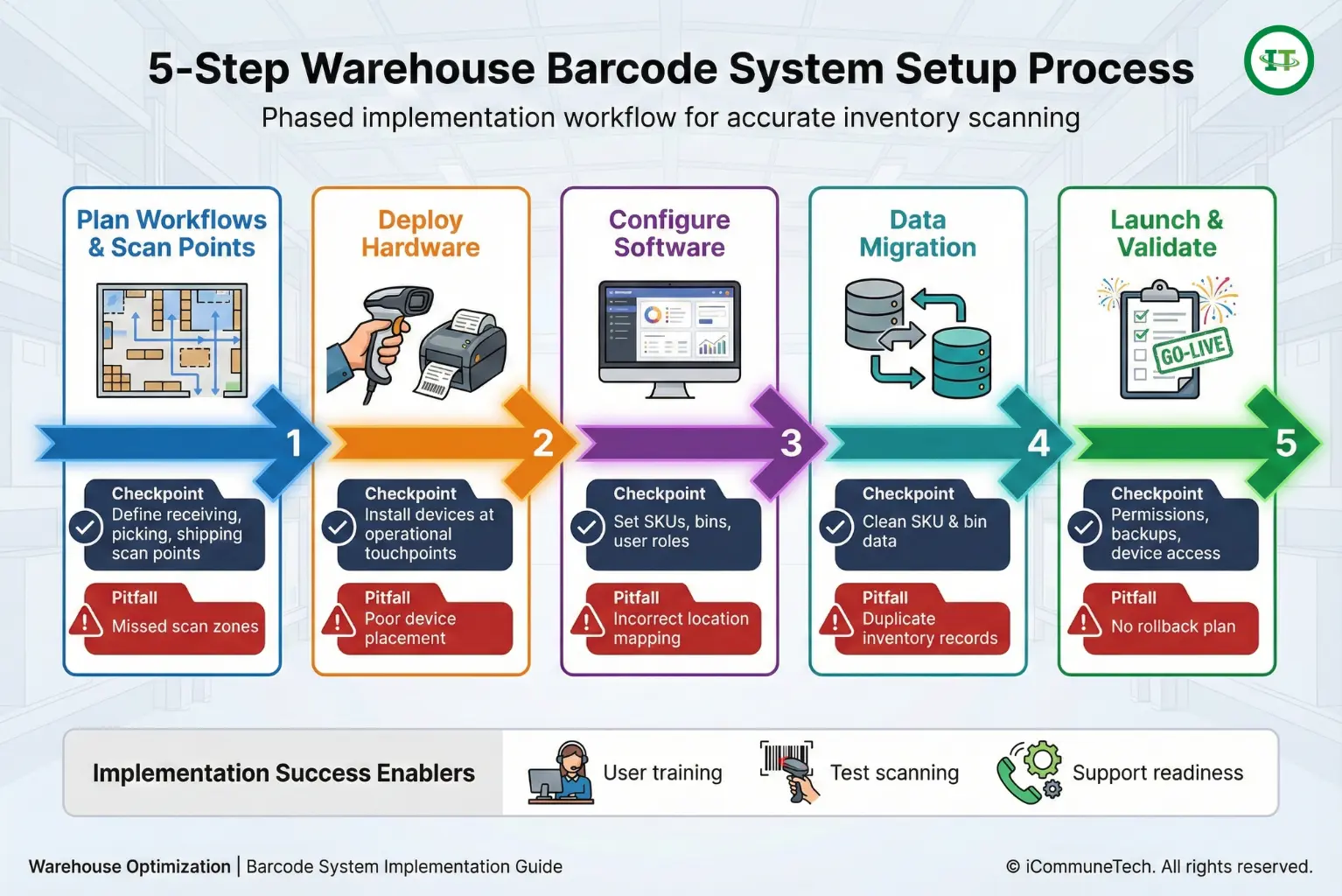
Setting up a barcode inventory system requires aligning scanners, software, and labels with real warehouse workflows. Most warehouses succeed by rolling out the system in phases, testing performance while daily operations continue.
Step 1: Plan workflows and test scan points
Start by mapping receiving, picking, and shipping processes. For example, define scan points during inbound pallet receiving, bin putaway, and order picking. Test scans during peak hours to identify delays, missed scans, or system lag before rollout.
Step 2: Deploy hardware based on movement patterns
Install scanners, printers, and network access where work actually happens. For instance, use fixed scanners at packing stations and mobile scanners in picking aisles or staging areas. This prevents unnecessary walking and reduces missed scans.
Step 3: Configure software for real warehouse transactions
Configure item masters, storage locations, and user roles before go-live. For example, define SKUs, assign bin locations, and restrict role-based actions like receiving or cycle counting. During warehouse rollout, incorrect location setup causes picked items to post to the wrong bins, creating stock discrepancies. Proper configuration ensures scans update inventory accurately during receiving, transfers, and order fulfillment.
Step 4: Data migration
Clean SKU data units, a measure, and location records before importing inventory data. For instance, merge duplicate SKUs, standardize naming conventions, and verify bin locations. In the warehouse rollout, unclean data causes the same item to appear under multiple SKUs, leading to incorrect stock counts after go-live. Cleaning data before migration prevents mismatches and inventory discrepancies once scanning begins.
Step 5: Go-live checklist
Confirm device access, user permissions, backups, and support contacts before launch. For example, ensure scanners are assigned to active users and rollback procedures are documented. In early-stage deployments, teams without rollback plans experienced shipment delays when scanning errors occurred. A complete go-live checklist reduces disruption and allows operations to continue during unexpected issues.
Best Practices for Inventory Labeling and Barcode Generation
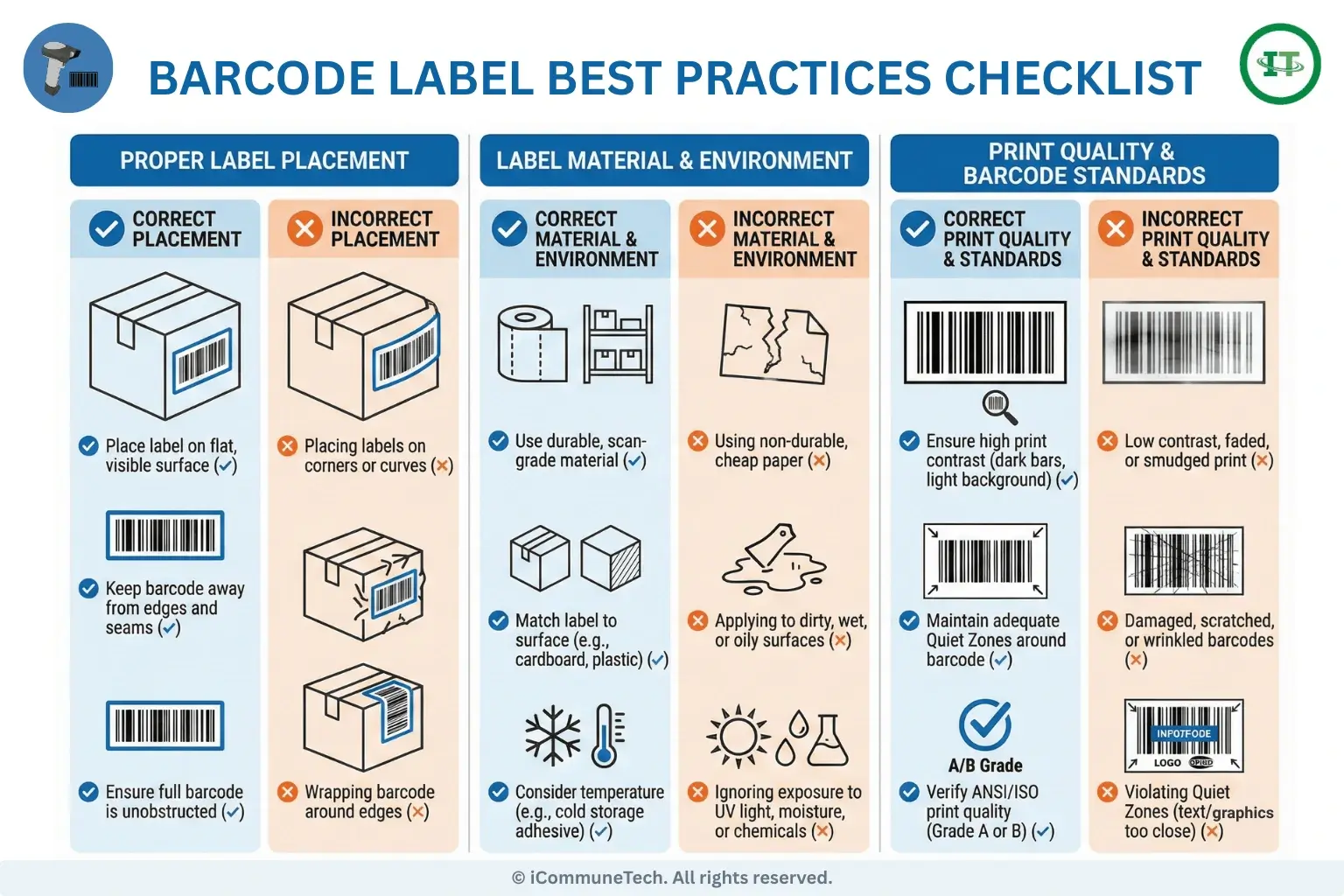
Barcode scan reliability varies widely across warehouses. Label design and print choices matter, teams often notice placement issues or material inconsistencies only after scan errors appear. In some cases, weak print quality shows up later as inventory discrepancies or added manual checks during routine operations.
Here are key factors to consider for accurate and reliable inventory labeling:
- Select label material and size: Match label materials to handling conditions. Use synthetic labels in cold storage, high-moisture areas, or environments with frequent abrasion. Select label sizes that support clear barcode printing and reliable scanning from expected distances, especially on curved or shrink-wrapped surfaces.
- Choose barcode format: Select barcode formats supported by scanners and inventory scanning systems, such as Code 128 or GS1, based on required data density.
- Follow placement guidelines: Apply labels to flat, visible surfaces, keeping them clear of edges, seams, folds, or shrink-wrap distortion.
- Account for environmental conditions: Adjust adhesives, print resolution, and contrast for temperature changes, humidity, and exposure.
- Prevent errors: Reduce scanning errors by 30% through standardizing label templates[5]. Run test scans on a defined schedule to ensure print quality is consistent before using labels on inventory.
Common Barcode Scanning Errors and How to Prevent Them
Barcode scanning errors trace back to label quality, placement, or workflow gaps. Low-contrast prints, damaged labels, or reflective surfaces interfere with scan reliability. Labels placed on curved edges or shrink wrap often distort barcodes during handling.
Operational habits also cause issues. Skipped scans during peak activity, shared devices without user tracking, and inconsistent scan points reduce data accuracy.
Teams prevent these errors by standardizing label templates, enforcing scan checkpoints, and validating scans before transactions post to the system.
Integrate Your Barcode System with Inventory Software for Real-Time Data Sync
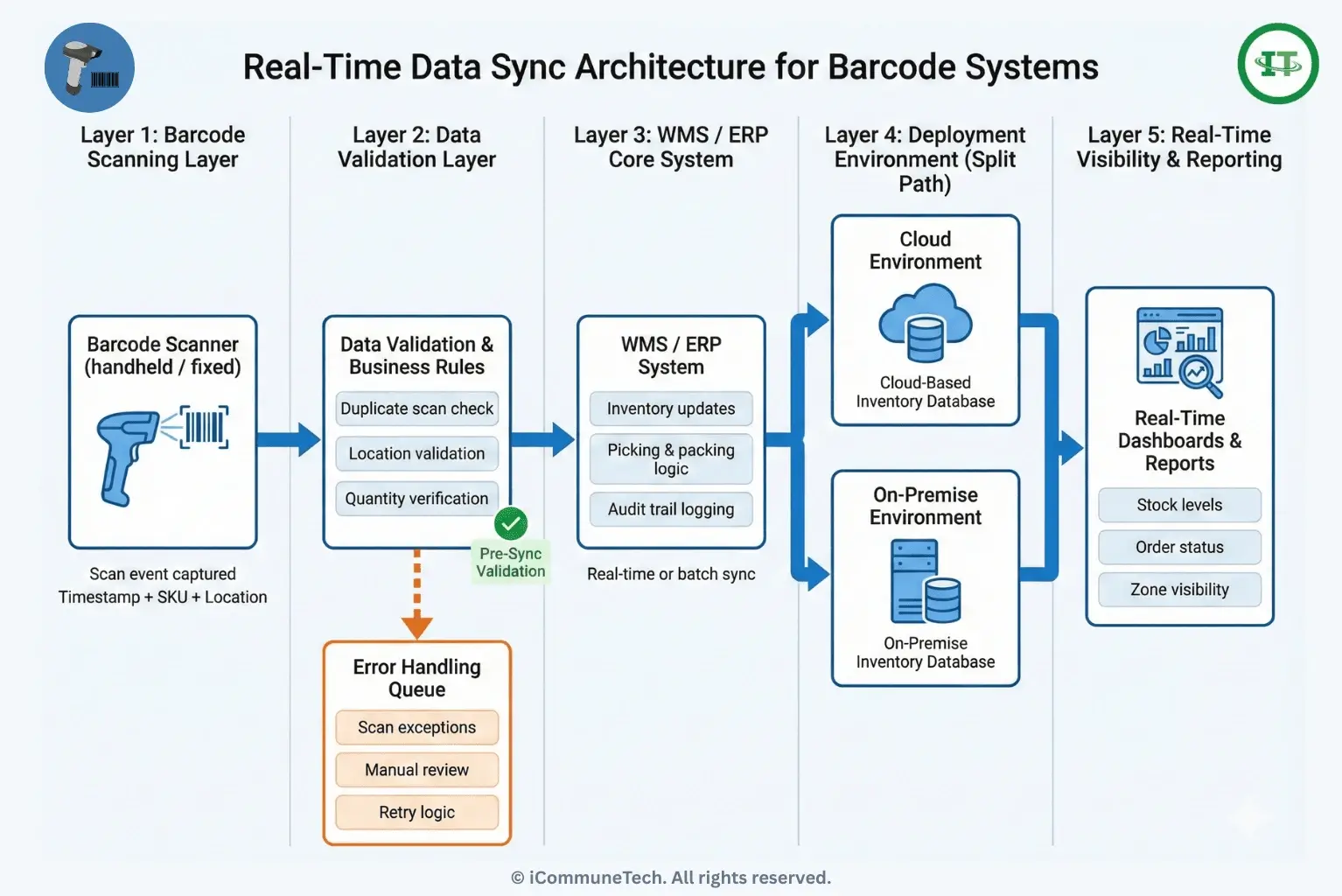
Barcode scanning delivers value when scan events update inventory systems. This enables real-time visibility, automation, and accurate reporting.
To ensure accurate and reliable real-time data synchronization, consider the following integration practices:
- Define sync frequency: Decide between real-time updates or scheduled batch syncs based on operational needs.
- Select cloud or on-premise systems: Cloud systems enable scalability and remote access, while on-premise systems offer localized control.
- Set data validation rules: Prevent duplicate scans, invalid locations, and quantity mismatches.
- Configure error handling: Route exceptions to review queues without halting operations.
- Enable audit trails: Log all scan activity to support reporting, traceability, and compliance.
To support barcode-driven picking, packing, and stock visibility across zones, modern warehouses rely on a dedicated Warehouse Management Software (WMS) that connects scanners to inventory workflows.
Training and Procedures for Accurate Barcode Scanning
Clear training programs and standardized procedures help ensure barcode scanning systems are used consistently. This reduces human error and maintains data integrity across shifts, roles, and locations.
Training helps teams overcome everyday warehouse management challenges, such as inconsistent scanning habits, shift handovers, and exception handling during peak periods.
Step 1: Build staff training plans
Create role-based training for receivers, pickers, packers, and supervisors. Train users on proper device handling, correct scan angles, and workflow-specific actions. Hands-on practice during live operations helps reduce missed scans and user errors.
Step 2: Define scanning workflows
Document when and where scans must occur during receiving, picking, packing, and shipping. For example, require scans at pallet receipt, bin placement, order picking, and shipment confirmation. Clear scan points ensure inventory updates remain accurate across processes.
Step 3: Document error correction procedures
Create clear procedures for handling damaged labels, failed scans, and count discrepancies. Train staff on how to reprint labels, rescan items, or escalate issues when mismatches occur. This prevents work stoppages and inaccurate inventory adjustments.
Step 4: Monitor performance
Track scan rates, error frequency, system downtime, and user compliance. Review reports regularly to identify training gaps or process issues. Performance monitoring helps teams correct problems before inventory accuracy declines.
Step 5: Enforce compliance standards
Maintain documented SOPs for barcode scanning activities. Conduct periodic audits to confirm scans follow defined workflows. Consistent enforcement ensures accuracy is maintained across shifts and locations.
How Barcode Scanners Improve Inventory Tracking Accuracy?
Barcode scanners improve inventory tracking accuracy by enforcing scan validation at each movement point. Each scan confirms item identity, quantity, and location before the system accepts the transaction. This removes guesswork during receiving, picking, and putaway.
Real-time inventory software strengthens accuracy by recording updates as scans occur rather than batching data later.
When scanners connect to inventory systems, teams avoid count drift caused by delayed entries, manual logs, or shift handovers. Accuracy improves because every movement leaves a recorded event tied to time, user, and location.
How Do Mobile and Cloud-Based Barcode Scanning Systems Improve Modern Logistics?
Mobile and cloud-based systems allow inventory management across multiple sites. Cloud architecture updates stock in real time.
Devices from handheld scanners to tablets offer flexibility. Security and access controls protect sensitive data.
These systems give multi-location visibility, streamline operations, and reduce costs, supporting remote or distributed warehouses at scale.
How to Scan Barcodes Using a Phone or Tablet?
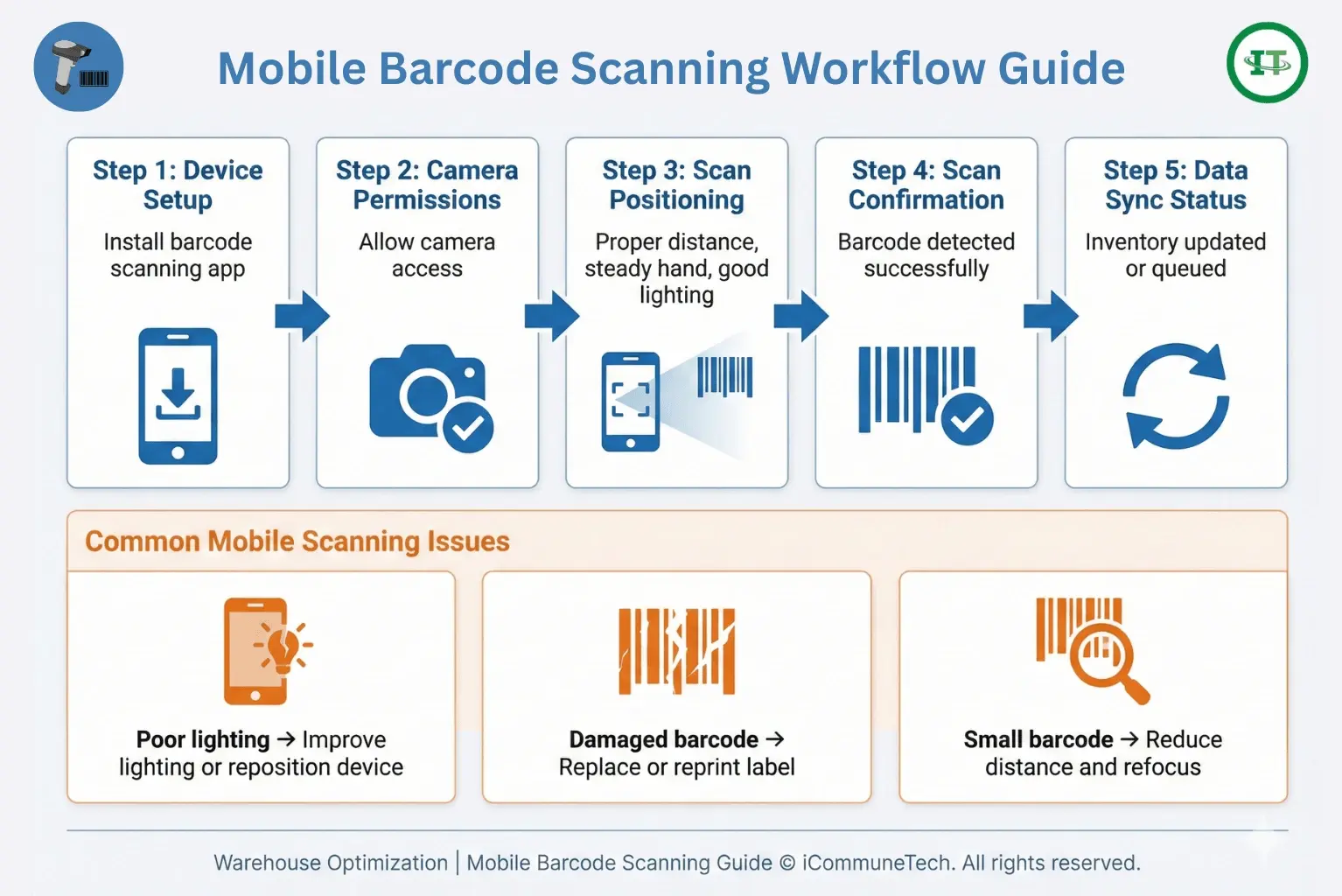
To scan barcodes using a phone or tablet, install a barcode scanning app and use the device camera.
- Install a barcode scanning app on your phone or tablet.
- Open the app and allow camera access.
- Point the device camera at the barcode under adequate lighting.
- Hold the device steady until the barcode is detected and scanned.
For small operations, native mobile apps are suitable for basic scanning tasks. Enterprise-grade apps offer additional features such as offline scanning, centralized device management, and improved accuracy.
Scanning performance may vary when barcodes are small, damaged, or poorly printed. Consistent device management and standard usage practices help maintain reliable scanning performance across users and locations.
Integrating Cloud Inventory Systems for Remote Barcode Access
Cloud inventory platforms centralize barcode data so teams can scan items and check inventory from any location without waiting for local updates. User permissions control access. These permissions define who can scan, edit, or approve transactions.
As items move, scan data syncs across sites. Stock records stay current instead of relying on batch updates at the end of a shift.
Scanners connect to WMS, ERP, and reporting tools through APIs, which keep data flowing between systems. Uptime affects daily operations, so backups and recovery processes must be in place to keep inventory data available during outages or system interruptions.
Barcode Vs RFID and Computer Vision: Comparing Scanning Technologies
Inventory tracking can involve different technologies. Barcode scanning works well for straightforward processes, while RFID may increase costs but reduces manual scanning. Computer vision can handle high-speed or complex operations, though it can be more complex to implement and maintain.
| Factor | Barcode Scanning | RFID | Computer Vision |
|---|---|---|---|
| Cost of implementation | Low upfront cost for scanners, labels, and software | Higher cost due to RFID tags, readers, and antennas | High cost driven by cameras, compute hardware, and software models |
| Accuracy and speed | High accuracy when labels are visible and scanned correctly | Fast bulk reads; accuracy affected by tag placement and interference | Accuracy depends on lighting, camera angles, and model training |
| Infrastructure requirements | Minimal, scanners, labels, and software integration | Requires readers, antennas, tagged items, and tuning | Requires cameras, stable mounting, network bandwidth, and processing |
| Maintenance complexity | Low; label replacement and device upkeep | Moderate; tag failures, reader calibration | High camera calibration, model updates, and environment changes |
| Use-case suitability | Picking, packing, receiving, and cycle counts | High-volume tracking, automated gates, pallets | Automated monitoring, exception detection, hands-free observation |
Barcode systems often rely on GS1 standards. These define formats like EAN and UPC for identifying products globally. Across warehouses, suppliers, and distribution partners, following these standards helps maintain consistent data capture.
GS1 rules guide how labels are created and formatted. In practice, this can help scanners interpret them more in different systems and locations. When labels follow these standards, issues like data mismatches or integration conflicts become less common.
RFID Vs Barcode Scanning Systems for Real-Time Inventory Accuracy
Tracking inventory uses tools such as RFID and barcodes, but they work in different ways. Barcodes need visible scans for each item, while RFID can read multiple tags automatically. These differences determine which system works best in a given warehouse.
| Factor | Barcode Scanning Systems | RFID Systems |
|---|---|---|
| Line-of-sight requirements | Requires clear visibility of the label during scanning | Does not require line of sight; tags can be read through packaging |
| Bulk scanning capability | Items are scanned one at a time | Multiple items can be read simultaneously |
| Tag and reader costs | Low-cost labels and scanners | Higher tag costs and specialized readers |
| Data granularity | High item-level accuracy with controlled scan events | Broad visibility; item-level accuracy depends on tag density and placement |
| ROI considerations | Strong ROI for small to mid-scale operations with manual workflows | Better ROI at larger scales where automation offsets infrastructure costs |
Conclusion
A barcode scanning system works best when it reflects how inventory moves through a warehouse each day. The right scanners, labels, and software turn routine scans into reliable stock updates instead of delayed corrections.
Start by defining clear scan points, test systems under real workloads, and train teams to follow consistent procedures.
Review scan data regularly to identify gaps early. Barcode scanning works best when teams implement it with intent. Support from a capable WMS improves accuracy, speed, and long-term inventory control.
Ready to Eliminate Inventory Errors and Reduce Labor Costs?
See how iCommuneTech WMS integrates barcode scanning into your existing workflows, without disrupting daily operations.
Let’s modernize your warehouse management system. Contact us for a strategy call.

Irshad Pathan


Web Development Expert
Irshad is a senior technical expert at iCommuneTech. He manages the iCommuneTech's Web Development Team, and has hands-on expertise in web development, Laravel development, Logistics, fleet management, and Supply Chain Management. He mentors the in-house team and enjoys describing his experience in words.
Read More Insights By Irshad →